A travel booklet is a practical way to organize travel plans, highlight destinations, and keep important trip information in one convenient place. Whether you are planning a family vacation, a romantic getaway, a group tour, or a business trip, a well-designed booklet can make the entire journey easier to manage.
Unlike a simple itinerary, a travel booklet can combine daily schedules, destination highlights, accommodation details, transportation information, maps, photographs, and helpful travel tips. It also serves as a memorable keepsake that captures the best moments and experiences of a trip.
Creating a travel booklet does not have to be complicated. With the right layout, useful information, and an attractive design, you can produce a professional travel guide that is easy to read, share, and print. This guide explains what to include, how to organize each section, and how to create a travel booklet that suits your needs.
What Is a Travel Booklet?
A travel booklet is a compact printed or digital guide that presents information about a destination, tour, vacation, or planned journey. It helps travelers understand where they are going, what they can do, and how to organize their time during the trip.
Travel booklets are commonly used by individuals, travel agencies, tour operators, schools, and organizations. Depending on their purpose, they may focus on a destination, provide a complete travel itinerary, promote a tour package, or serve as a personal travel journal.
A travel booklet can also be called a travel guide booklet, travel itinerary booklet, vacation booklet, or travel brochure. Although these formats have different purposes, they share the goal of presenting travel information in an attractive and accessible format.
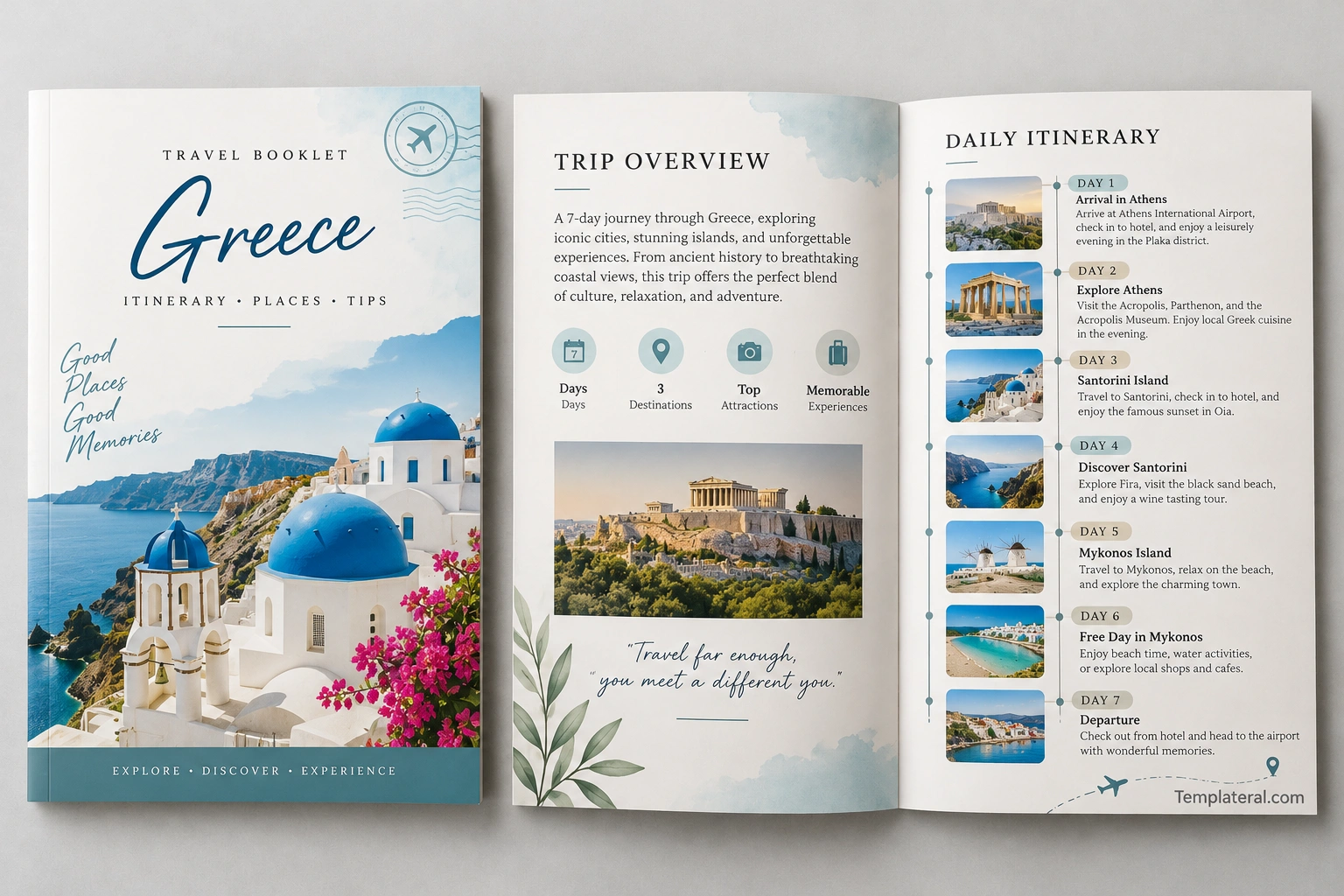
What to Include in a Travel Booklet
The contents of a travel booklet depend on the type of trip and the intended audience. A personal vacation guide may focus on daily plans, while a tour booklet may include package details and destination information. The following sections provide a useful starting point.
1. Cover Page
The cover is the first thing readers see, so it should communicate the destination and overall theme of the trip. Choose a clear title and an appealing photograph that represents the experience.
Consider including these details:
- Destination name: Identify the city, country, region, or tour location.
- Travel dates: Include the departure and return dates when relevant.
- Trip title: Use a simple title such as “Seven Days in Greece” or “Our Family Adventure.”
- Cover image: Feature a recognizable landmark, scenic landscape, or destination photograph.
- Traveler or organization name: Add this information when it helps identify the trip.
Keep the cover uncluttered. One strong image, a readable heading, and a few carefully chosen design elements are usually enough to create a professional appearance.
2. Trip Overview
A trip overview gives readers a quick understanding of the journey. Place essential details near the beginning so travelers can find them without searching through every page.
This section may include the destination, travel duration, departure and arrival information, accommodation details, transportation arrangements, and a short description of the trip’s main purpose.
For a multi-destination vacation, include a brief summary of each location. This helps travelers understand the overall route before reviewing the daily itinerary.
3. Daily Travel Itinerary
The daily itinerary is often the most useful part of a travel booklet. It outlines planned activities and helps travelers manage their time throughout the journey.
For each day, consider listing:
- The date and destination.
- Planned activities and attractions.
- Transportation between locations.
- Accommodation or check-in details.
- Meal arrangements or restaurant suggestions.
- Important reservations and confirmation details.
Arrange activities in a logical order based on location and travel time. Leave room for breaks, unexpected delays, and spontaneous discoveries. A realistic schedule is more useful than an itinerary that attempts to fit too many activities into one day.
4. Destination Highlights
Use a dedicated section to introduce the places travelers will visit. Include short descriptions of important landmarks, cultural attractions, natural scenery, museums, local markets, or outdoor activities.
Focus on information that helps readers decide what to see and why it matters. Instead of writing lengthy descriptions, provide a few practical details about each attraction, such as its location, estimated visit duration, and any advance booking requirements.
Destination photographs can make this section more engaging. Choose clear images that accurately represent the locations and support the information in the text.
5. Maps and Transportation Information
Maps and transportation details help travelers move between destinations with less confusion. Depending on the trip, this section may include airport transfer instructions, train routes, public transportation options, driving directions, or meeting points.
Include important departure times, terminal information, station names, and transfer arrangements when available. For international travel, explain any essential transportation details that might be unfamiliar to visitors.
Check that all routes and schedules are current before distributing the booklet. If transportation information may change, provide official websites or booking references where travelers can verify the latest details.
6. Accommodation and Essential Travel Details
A useful travel booklet keeps important reservations and contact information easy to find. Create a dedicated section for accommodation and other essential arrangements.
You may include hotel names, addresses, check-in and check-out times, booking references, emergency contacts, and the contact details of the tour organizer.
For privacy, avoid printing sensitive personal information or unnecessary payment details in copies that may be shared widely. Keep confidential booking information in a secure location when possible.
7. Travel Tips and Packing Checklist
A short travel tips section can help travelers prepare for their destination. Include advice that is relevant to the season, local customs, planned activities, and the length of the trip.
A packing checklist may cover:
- Travel documents and identification.
- Weather-appropriate clothing and comfortable footwear.
- Chargers, adapters, and essential electronics.
- Personal care items and necessary medications.
- Reusable water bottles and day bags.
- Any equipment required for planned activities.
Keep the checklist practical rather than exhaustive. Travelers can customize it according to their destination, personal needs, and luggage allowance.
How to Choose the Best Travel Booklet Design
A good travel booklet design combines visual appeal with clear organization. The layout should make information easy to scan while reflecting the atmosphere of the destination.
Choose Colors That Match the Destination
Color can help establish the booklet’s visual identity. Blue and white work well for coastal destinations, while earthy tones suit nature trips and outdoor adventures. Neutral colors can create a clean, professional appearance for business travel or formal tour packages.
Limit the palette to a few complementary colors. Consistent colors across headings, icons, captions, and page accents make the booklet look more cohesive.
Use Readable Typography
Choose fonts that remain easy to read in both printed and digital formats. A distinctive heading font can add personality, while a simple body font helps readers understand schedules and practical information.
Maintain consistent font sizes, heading styles, and line spacing. Avoid placing text over busy photographs, and use sufficient contrast between the text and background.
Include High-Quality Images
Photographs are an important part of a travel booklet because they help readers visualize the destination. Select images that are relevant to the itinerary and provide a clear impression of the places being featured.
Use consistent image sizes and avoid overcrowding pages with too many photographs. Add short captions when they provide useful context, such as the name of a landmark or the location of an attraction.
Select a Suitable Page Format
The best format depends on how much information the booklet needs to contain.
- Single-page travel guide: Ideal for a short excursion or a simple day-trip schedule.
- Bi-fold travel booklet: Suitable for a compact overview, destination highlights, and essential trip details.
- Tri-fold travel brochure: Useful for presenting a destination, tour package, or several highlights in a portable format.
- Multi-page travel booklet: Best for detailed itineraries, multiple destinations, photographs, maps, and practical advice.
Choose a format that provides enough space for the content without making the booklet unnecessarily long. For printed booklets, confirm the page dimensions and folding requirements before finalizing the design.
How to Create a Travel Booklet Step by Step
You can create a professional travel booklet using a document editor, a graphic design tool, or an editable travel booklet template. Following a structured process helps you avoid missing important information.
Step 1: Define the Purpose
Decide who will use the booklet and what it needs to accomplish. A personal vacation planner requires different information from a promotional travel brochure or an organized group tour guide.
Identify the audience, destination, trip duration, and most important information before choosing a design.
Step 2: Gather Accurate Travel Information
Collect the itinerary, accommodation details, transportation arrangements, attraction information, photographs, and relevant travel advice. Verify dates, addresses, reservation times, and operating schedules using reliable sources.
Organize the information into sections before placing it in the layout. This makes it easier to identify missing details and remove unnecessary content.
Step 3: Choose a Travel Booklet Template
A travel booklet template provides a ready-made structure for your content. It can save time by offering predefined pages, headings, image areas, and itinerary layouts.
Choose a template that matches your preferred style and works with your editing software. Check whether you can customize the colors, fonts, photographs, page size, and number of sections.
Step 4: Customize the Pages
Add your destination information, daily itinerary, photographs, maps, and travel tips. Use headings and short paragraphs to make each section easy to navigate.
Keep the design consistent throughout the booklet. Leave enough white space around text and images, and make sure important details are not hidden by decorative elements.
Step 5: Review and Export the Booklet
Proofread the content and verify all practical information before sharing the booklet. Check that the itinerary is realistic, links work correctly, and images appear at an appropriate resolution.
For digital distribution, export the finished booklet as a PDF when possible. For printing, review the margins, page order, image quality, and folding instructions. Print one test copy before producing multiple copies.
Practical Tips for a Better Travel Booklet
A few simple improvements can make your travel booklet more useful and professional.
- Prioritize essential information: Put schedules, addresses, and reservation details where readers can find them quickly.
- Keep descriptions concise: Use short paragraphs and clear labels instead of long blocks of text.
- Allow flexibility: Include realistic travel times and free periods for rest or unexpected changes.
- Verify changing details: Recheck opening hours, transportation schedules, and reservation information before departure.
- Make it easy to navigate: Use consistent headings, page numbers, and clear section labels.
- Prepare a digital version: A PDF makes the booklet easy to access on a phone or tablet.
- Protect private information: Share only the personal and reservation details that recipients actually need.
Remember that a travel booklet should support the journey, not complicate it. A clear and practical design is more valuable than unnecessary decoration or excessive detail.
Travel Booklet Examples and Template Ideas
Looking at a sample travel booklet can help you decide how to organize your own pages. Different layouts suit different travel experiences, so choose an example that matches your purpose.
A vacation travel booklet might feature destination photographs, a daily itinerary, accommodation details, and local recommendations. A travel agency booklet may focus on tour highlights, package inclusions, schedules, and booking information. A school trip booklet may emphasize meeting points, activity schedules, safety guidance, and emergency contacts.
For a personal travel journal, consider leaving space for notes, memorable experiences, favorite places, and photographs collected during the journey. This turns the booklet into a keepsake as well as a planning tool.
When choosing a travel booklet template, look for editable sections, readable typography, consistent page layouts, and suitable image areas. A flexible template allows you to adapt the design without rebuilding the entire document.
Frequently Asked Questions About Travel Booklets
What is the purpose of a travel booklet?
A travel booklet organizes important trip information in one convenient guide. It can include an itinerary, destination highlights, maps, accommodation details, transportation arrangements, and practical travel tips.
What is the difference between a travel booklet and a travel brochure?
A travel brochure often promotes a destination, attraction, or tour package. A travel booklet usually provides more detailed information, such as daily schedules, practical arrangements, and destination guidance. However, the two formats can overlap depending on their intended use.
How many pages should a travel booklet have?
The ideal length depends on the trip. A day trip may need only one page, while a multi-day vacation with several destinations may require a multi-page booklet. Include enough information to make the journey easier without overwhelming the reader.
Can I create a travel booklet in Microsoft Word?
Yes. Microsoft Word can be used to create a travel booklet with headings, photographs, tables, and page layouts. An editable template can make the process faster. You can export the completed document as a PDF for easier sharing and printing.
What should I include in a travel itinerary booklet?
Include travel dates, destinations, daily activities, transportation details, accommodation information, important reservations, and useful contact details. You can also add maps, attraction recommendations, and packing tips when they are relevant to the trip.
Can a travel booklet be digital?
Yes. A digital travel booklet can be saved as a PDF and accessed on a smartphone, tablet, or computer. Digital versions are easy to share and update, making them useful for group travel and changing itineraries.
What makes a good travel booklet template?
A good template offers a clear layout, editable sections, readable fonts, space for photographs, and a format suitable for printing or digital sharing. It should make essential travel information easy to find and customize.
Conclusion
A travel booklet is a useful way to organize trip details, introduce destinations, and make travel planning more enjoyable. By combining a clear itinerary with practical information and attractive visuals, you can create a guide that supports travelers throughout their journey.
Start by defining the purpose of the booklet, gathering accurate information, and choosing a suitable template. Then organize the pages, add relevant photographs, and review every detail before printing or sharing the final version.
Whether you are planning a personal vacation, preparing a group tour, or creating a promotional travel guide, a well-designed travel booklet can make information easier to use and preserve the excitement of exploring new places.
Download: Travel Booklet Template
