A well-designed event booklet helps attendees understand an event, follow its schedule, and find essential information without searching through multiple documents. Whether you are organizing a corporate gathering, community festival, educational workshop, or networking event, a clear booklet can make the experience more organized and professional.
An event booklet brings important details together in one convenient publication. It can include a welcome message, event agenda, speaker profiles, venue information, activity descriptions, and contact details. With the right layout, it also reflects your event’s identity and creates a positive first impression.
In this guide, you will learn what to include in an event booklet, how to choose an effective design, and how to prepare a polished version for printing or digital distribution. You will also find practical tips for customizing an event booklet template to suit your needs.
What Is an Event Booklet?
An event booklet is a printed or digital publication that provides attendees with useful information about an organized event. It serves as a reference guide before, during, and sometimes after the event.
Depending on the occasion, an event booklet may contain the event overview, schedule, speaker biographies, activity descriptions, venue details, sponsor acknowledgments, and contact information. Some booklets also include maps, networking information, notes pages, or a closing message.
Unlike a simple event flyer, a booklet offers more space for detailed information. It can guide attendees through a multi-session program while presenting the event’s branding in a consistent and professional format.
Event Booklet Template and Sample Layout
An event booklet template gives organizers a practical starting point for arranging event information. A ready-made layout can save time, establish consistent formatting, and make it easier to update content as plans develop.
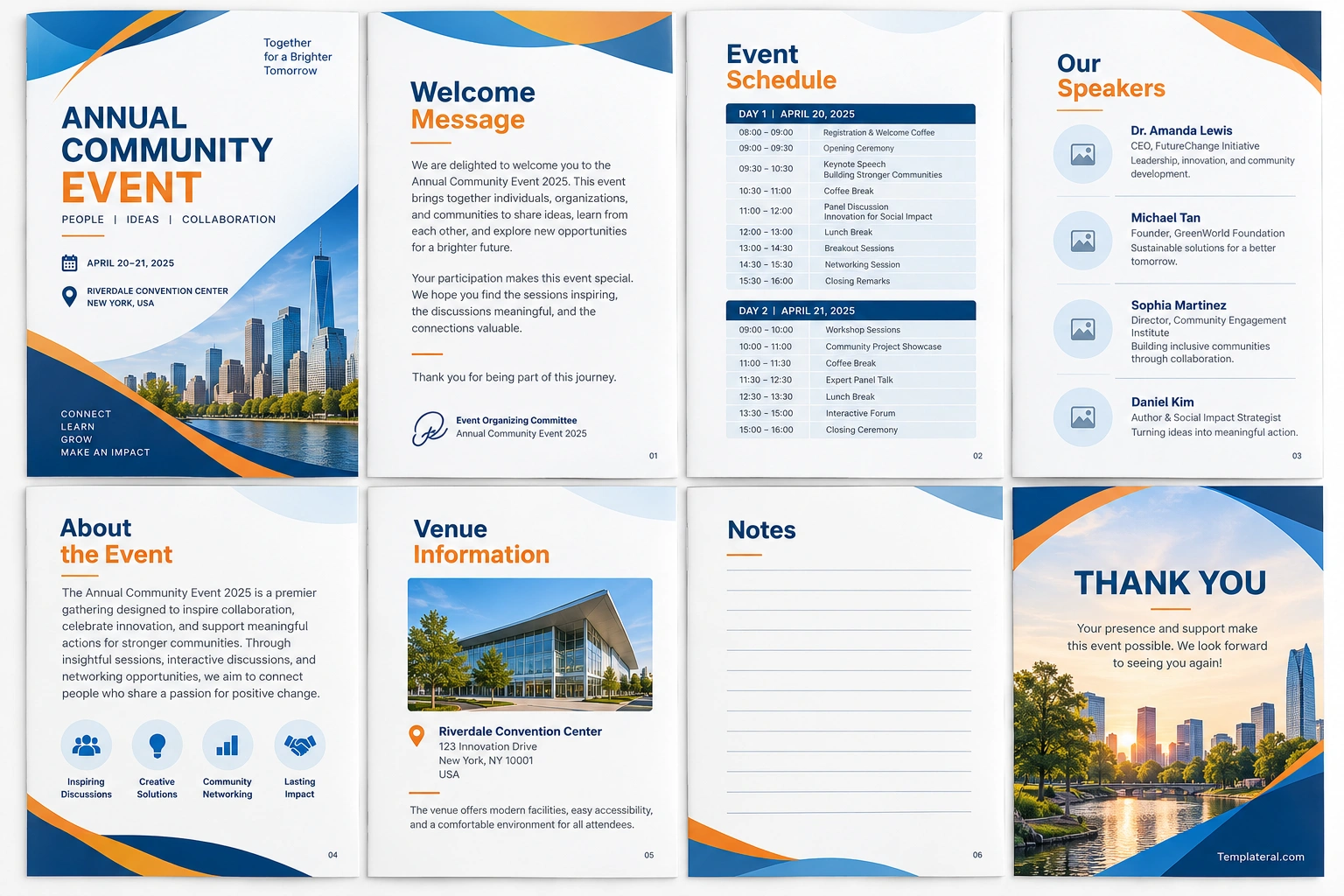
The sample below demonstrates an eight-page event booklet concept using a blue, orange, and white color palette. It includes a cover, welcome message, event schedule, speaker profiles, event overview, venue information, notes page, and closing message.
This sample layout is suitable as inspiration for business events, community gatherings, conferences, workshops, and professional networking sessions. You can adapt the colors, headings, images, and page order to reflect your own event.
What to Include in an Event Booklet
The content of your event booklet should reflect the type, duration, and purpose of your event. A short workshop may require only a few pages, while a multi-day gathering may need a more detailed program.
1. Cover Page and Event Details
The cover introduces the event and establishes its visual identity. Keep it clear and uncluttered so attendees can recognize the event name and key details quickly.
Consider including:
- Event name and theme
- Date and location
- Organizer or organization name
- Logo or approved brand mark
- A short tagline or description
Use colors and typography that match the event’s branding. A strong cover should be visually appealing without competing with the information inside the booklet.
2. Welcome Message
A welcome message introduces the purpose of the gathering and helps attendees feel included. It may come from the event organizer, company leader, committee chair, or host.
Keep the message concise and relevant. Welcome participants, explain the event’s main goal, and acknowledge the people who helped make it possible.
3. Event Schedule and Agenda
The agenda is one of the most important parts of an event booklet. It helps attendees plan their time, identify sessions of interest, and arrive at the right place when activities begin.
A useful event schedule may include:
- Start and end times for each activity
- Session or presentation titles
- Speaker or presenter names
- Room names or activity locations
- Breaks, meals, and networking periods
- Special activities and closing remarks
For events lasting several days, organize the schedule by date. Use consistent time formatting and clearly identify simultaneous sessions so attendees can choose the right activities.
4. Speaker and Presenter Profiles
If your event includes guest speakers, panelists, instructors, or presenters, provide a short profile for each person. Include their name, professional title, organization, and relevant experience.
Keep the biographies concise and consistent in length. Attendees should be able to understand who is presenting and why the topic is relevant without reading lengthy descriptions.
5. Event Overview and Activity Descriptions
An event overview explains why the gathering is taking place and what participants can expect. It can describe the event’s objectives, main themes, intended audience, and expected outcomes.
For workshops or events with multiple activities, include short descriptions of the sessions. This helps attendees decide which activities are most relevant to their interests.
6. Venue and Contact Information
Practical venue information makes it easier for attendees to arrive prepared. Include the venue name, full address, room details where relevant, and contact information for the organizing team.
Depending on the event, you may also provide parking guidance, public transportation details, accessibility information, Wi-Fi instructions, or a venue map. Verify all logistical details before distributing the booklet.
7. Sponsors and Event Partners
If sponsors or partners support the event, include an acknowledgment section where appropriate. Use approved logos and follow any branding or sponsorship requirements regarding placement and size.
Keep this section organized so that sponsor recognition complements the event information rather than distracting from the schedule and essential details.
8. Notes Page and Closing Message
A notes page gives attendees room to record ideas, questions, and important takeaways. It can be especially useful for conferences, training sessions, and educational workshops.
The closing page can thank attendees, recognize contributors, and provide the organizer’s website or contact information. It gives the booklet a clear ending and makes it easier for participants to find follow-up resources.
How to Design a Professional Event Booklet
A professional event booklet balances attractive visuals with practical readability. Every design choice should support the information and help attendees navigate the publication easily.
Choose a Consistent Color Palette
Select a small group of colors that matches your event branding. Blue and white can create a clean corporate appearance, while orange can highlight important headings or calls to attention.
Use accent colors consistently and maintain sufficient contrast between text and background. This helps the booklet remain readable in both printed and digital formats.
Use Clear Typography
Choose readable fonts for body text and use headings to establish a clear information hierarchy. Limit the number of font families and avoid decorative typefaces for detailed schedules or long paragraphs.
Make session titles, times, and speaker names easy to scan. Consistent font sizes and spacing help readers find important information quickly.
Organize Each Page Around One Purpose
Give each page a clear role, such as presenting the agenda, introducing speakers, or explaining venue details. Avoid placing too many unrelated sections on the same page.
Use consistent margins, alignment, spacing, and page numbers throughout the booklet. These details create a cohesive appearance and make the publication easier to navigate.
Use Images and Graphics Carefully
Relevant images can improve an event booklet when they help explain the event or reinforce its identity. Consider approved venue photographs, speaker portraits, organization logos, maps, and simple icons.
Use high-resolution assets for printing and check their appearance at the final page size. Avoid unnecessary decorations that make important information harder to read.
How to Create and Prepare an Event Booklet
A simple production process can help prevent errors and reduce last-minute changes. Follow these steps to prepare an event booklet efficiently.
- Step 1: Gather the content. Collect the event name, dates, venue details, schedule, speaker biographies, sponsor information, and contact details.
- Step 2: Choose a template. Select a layout that suits the event’s size, branding, and amount of content.
- Step 3: Organize the pages. Arrange the information in a logical order, starting with the cover and essential event details.
- Step 4: Apply consistent branding. Use the same color palette, typography, spacing, and heading styles throughout the booklet.
- Step 5: Proofread carefully. Check names, titles, dates, times, addresses, links, and spelling.
- Step 6: Review the layout. Check for text overflow, inconsistent alignment, missing information, and low-resolution images.
- Step 7: Export and test. Prepare a print-ready PDF or digital version, then review it on the intended devices or with your print provider.
Printed vs. Digital Event Booklets
Printed and digital event booklets both help attendees access important information. The right format depends on your audience, budget, distribution method, and event requirements.
Printed Event Booklets
A printed booklet gives attendees a physical reference they can carry, annotate, and consult without opening a device. It can be especially helpful when participants need to check schedules frequently or take handwritten notes.
However, printed booklets require production time and printing costs. Changes made after printing can also be difficult to communicate, so confirm the content before ordering copies.
Digital Event Booklets
A digital booklet can be shared through email, an event website, or a QR code. A searchable PDF helps attendees find sessions quickly and access links to related resources.
Digital versions can be easier to distribute and update. Make sure the document is readable on mobile devices, uses accessible formatting where possible, and contains working links.
For larger events, offering both printed and digital versions can provide flexibility for attendees with different preferences.
Common Event Booklet Mistakes to Avoid
A visually appealing booklet is only effective when the information is accurate and easy to use. Review your design for these common issues before publication.
- Overcrowded pages: Too much text makes the booklet difficult to scan.
- Inconsistent formatting: Different fonts, margins, and heading styles can make the design look unfinished.
- Outdated schedules: Incorrect times or room assignments can confuse attendees.
- Small text: Make sure important details remain readable at the final print size.
- Unverified information: Confirm names, addresses, contact details, and sponsor requirements.
- Poor print preparation: Check page dimensions, margins, image quality, and export settings before sending the file to a printer.
Ask another person to review the final booklet before distribution. A fresh perspective can help identify errors or unclear wording that may have been overlooked during editing.
Frequently Asked Questions About Event Booklets
What is the purpose of an event booklet?
An event booklet gives attendees one organized source of information about an event. It commonly includes the schedule, speaker details, venue information, activity descriptions, and organizer contact details.
What should an event booklet include?
A typical event booklet includes a cover, welcome message, agenda, speaker profiles, event overview, venue details, and closing message. Sponsor information and notes pages can be added when relevant.
How many pages should an event booklet have?
The page count depends on the event’s duration and complexity. A short workshop may need only a few pages, while a multi-day event with many speakers and activities may require a longer booklet.
What is the best format for an event booklet?
PDF is a practical format for digital distribution because it preserves the layout across many devices. For printed booklets, use the page dimensions and export specifications required by your printing provider.
Can I use an event booklet template?
Yes. An event booklet template can save time and help maintain consistent formatting. Replace the sample content with accurate event information, customize the branding, and review every page before publishing.
Should an event booklet be printed or digital?
The best choice depends on your audience and event needs. Printed booklets are convenient for quick reference and handwritten notes, while digital versions are easy to share, search, and update. Providing both can be useful for larger events.
How can I make an event booklet look professional?
Use a consistent color palette, readable fonts, clear headings, balanced spacing, and high-quality graphics. Organize the content logically and proofread all event details before exporting the final document.
Create an Event Booklet That Keeps Attendees Informed
A well-planned event booklet helps attendees prepare for activities, follow the schedule, and find important information throughout the event. By combining a clear agenda, useful speaker profiles, accurate venue details, and consistent branding, you can create a publication that is both practical and professional.
Start with an event booklet template that fits your needs, customize the content, and check every detail before distribution. Whether you choose a printed booklet, a digital PDF, or both, a thoughtful layout makes event information easier to access and helps create a more organized experience for everyone involved.
Download: Event Booklet Template
