A booklet is a compact printed or digital publication designed to present information in an organized and easy-to-read format. Unlike a single-page flyer, a booklet can provide more space for detailed explanations, images, instructions, product information, or educational content while remaining convenient to read and share.
Booklets are used by businesses, schools, nonprofits, organizations, event planners, and individuals for many different purposes. A well-designed booklet can introduce a company, explain a service, provide instructions, showcase products, or organize important information into a professional document. Using a booklet template can make the planning and design process much easier, especially when you want a consistent structure without starting from a blank page.
What Is a Booklet?
A booklet is a small multi-page publication that usually contains a cover, several interior pages, and a back page. It can be printed on folded sheets of paper or distributed as a digital document such as a PDF.
The exact format depends on its purpose. Some booklets contain only a few pages, while others provide extensive information across multiple sections. The most important feature is that the content is divided into logical pages that guide the reader from one topic to the next.
Common examples include:
- Product and service booklets
- Company information booklets
- Event programs
- Educational booklets
- Training and instruction booklets
- Employee handbooks
- Church and community publications
- Travel and tourism guides
- Healthcare information booklets
- Nonprofit and fundraising publications
Why Use a Booklet?
A booklet provides more room for information than a flyer or brochure while still being relatively compact. This makes it useful when readers need more than a quick introduction but do not need a full-length book.
Present Information in an Organized Format
A booklet allows related information to be divided into sections. Each page can focus on a specific topic, making the overall document easier to navigate.
Create a Professional Presentation
A thoughtfully designed booklet can make information look more polished and consistent. A clear cover, logical headings, readable typography, and balanced page layouts can help create a professional impression.
Make Detailed Information Easier to Read
Large amounts of information can feel overwhelming when placed on a single page. A booklet separates the content into smaller sections, giving readers a more comfortable reading experience.
Common Types of Booklets
The best booklet format depends on the audience and the information you need to present. Understanding common booklet types can help you choose an appropriate structure.
Business Booklet
A business booklet can introduce a company, explain its mission, present services, and provide contact information. It can also be used as a sales or presentation document.
Product Booklet
A product booklet is designed to showcase products or product categories. It may include descriptions, specifications, features, benefits, usage instructions, and purchasing information.
Educational Booklet
Educational booklets are useful for presenting lessons, study materials, guides, classroom information, or educational resources. Clear headings and short sections are especially helpful in this format.
Event Booklet
An event booklet can contain a schedule, speaker information, venue details, event guidelines, maps, and other useful information. Conferences, workshops, ceremonies, and community events can all benefit from this format.
Instruction Booklet
An instruction booklet explains how to complete a process or use a product. Numbered steps, diagrams, warnings, and short explanations can make instructional content easier to follow.
Key Elements of a Booklet
Although every booklet can have a different purpose, several elements commonly appear in an effective design.
- Cover page: Introduces the topic and creates the first impression.
- Table of contents: Helps readers find important sections quickly.
- Introduction: Explains the purpose and context of the booklet.
- Main content: Provides the primary information readers need.
- Images or graphics: Support explanations and improve visual communication.
- Headings: Divide information into clear sections.
- Callouts: Highlight important facts, tips, or key messages.
- Contact information: Gives readers a way to follow up when appropriate.
- Conclusion or final section: Summarizes the key information or provides a next step.
Booklet Template: A Simple Structure to Follow
A booklet template provides a ready-made framework for organizing your content. Instead of deciding the layout of every page from scratch, you can start with predefined sections and customize them for your needs.
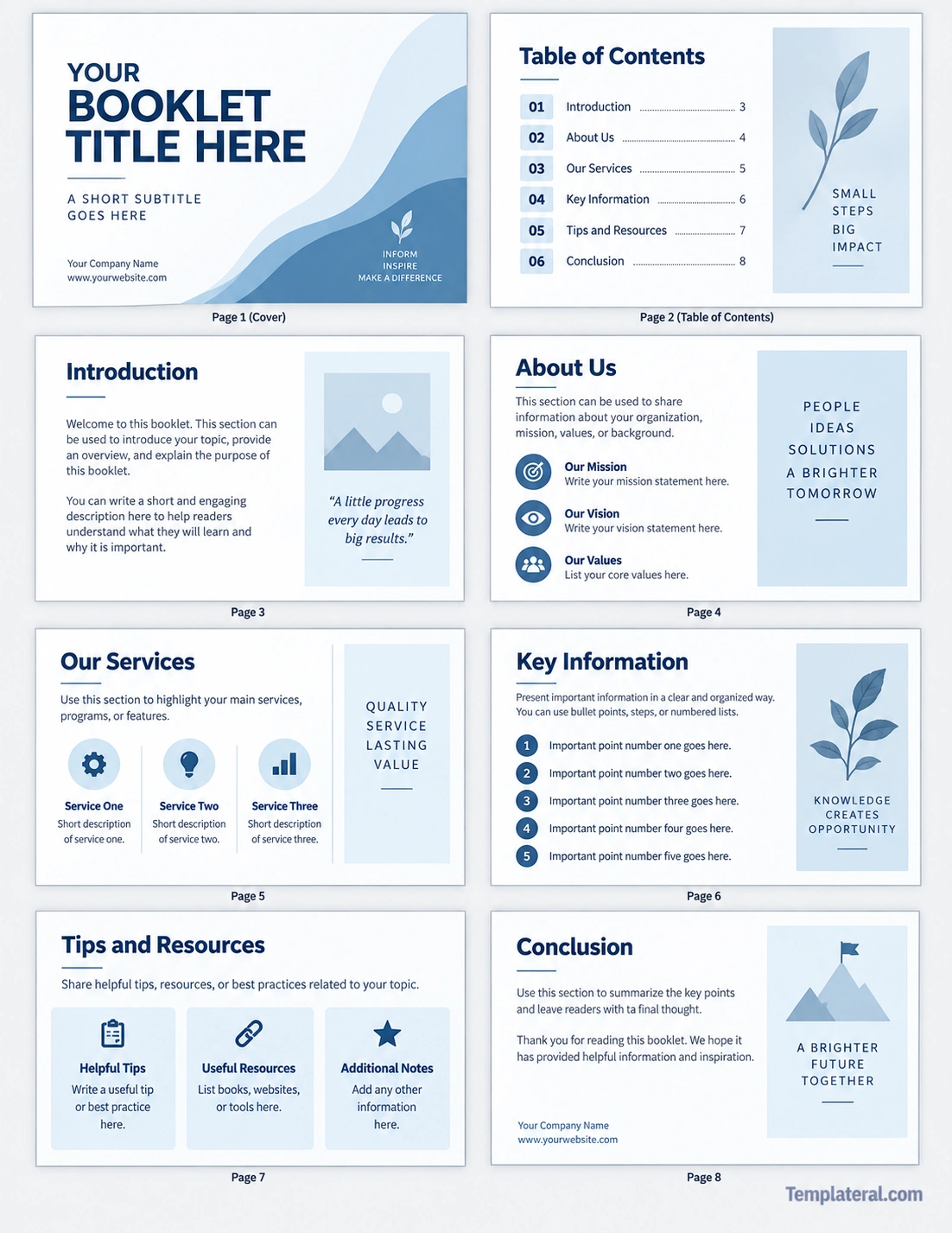
A practical booklet template may include a cover page, table of contents, introduction, organization overview, services or key information, tips and resources, and a concluding page. You can remove sections that do not apply and add pages when more information is required.
Here is an example of how a basic booklet structure can be organized:
- Page 1: Cover and title
- Page 2: Table of contents
- Page 3: Introduction
- Page 4: About the organization or topic
- Page 5: Main services, products, or information
- Page 6: Key information and important details
- Page 7: Tips, resources, or additional information
- Page 8: Conclusion and contact details
This structure is flexible enough for business, educational, informational, and personal projects.
How to Create a Booklet
Creating a booklet becomes easier when you plan the content before working on the visual design. Follow these steps to create a useful and professional publication.
1. Define the Purpose
Start by identifying what the booklet needs to accomplish. A product booklet may need to persuade customers, while an educational booklet may focus on explaining information clearly.
Write down the primary goal in one sentence. This simple step can help you decide which information belongs in the final document.
2. Identify Your Audience
Consider who will read the booklet. Think about their level of knowledge, interests, questions, and expectations.
A booklet for new employees, for example, may require more explanations than a technical document created for experienced professionals.
3. Plan the Sections
Create a basic outline before writing the pages. Group related information together and arrange the sections in a logical order.
A good booklet should have a natural flow. Readers should understand why they are seeing each section and how it connects to the information before and after it.
4. Write Concise Content
Keep paragraphs focused and avoid unnecessary repetition. Use headings, bullet points, numbered steps, and short paragraphs when they improve readability.
Readers should be able to scan the booklet and quickly identify the most important information.
5. Add Supporting Visuals
Images, diagrams, icons, charts, and other graphics can support the written content. However, visuals should have a purpose rather than simply filling empty space.
Choose images that clarify an idea, demonstrate a process, highlight a product, or make important information easier to understand.
6. Review the Layout
Check every page for consistency. Look at margins, spacing, font sizes, headings, page numbers, images, and alignment.
Make sure important content is not crowded near page edges and that every page has enough white space.
Tips for Designing an Effective Booklet
Choose Readable Typography
Use fonts that are easy to read in both printed and digital formats. Avoid using too many font families or decorative typefaces throughout the document.
Create a clear hierarchy with larger headings, readable body text, and consistent subheadings.
Use Consistent Branding
If the booklet represents a business or organization, use consistent brand elements. Colors, logos, typography, and visual styles should work together across all pages.
Leave Enough White Space
White space gives content room to breathe. A page does not need to be filled completely to look professional.
Proper spacing between headings, paragraphs, images, and sections can significantly improve readability.
Make the Cover Clear
The cover should tell readers what the booklet is about at a glance. Use a clear title and, when appropriate, a short subtitle that provides additional context.
Use a Logical Page Order
Arrange the pages so the reader can move naturally from introduction to detailed information and finally to the conclusion or next step.
Printed Booklet vs. Digital Booklet
Booklets can be created for print, digital distribution, or both. Each format has different considerations.
Printed Booklet
A printed booklet needs careful attention to page size, margins, paper orientation, folding, page order, and print quality. US Letter is a common page size for many business and educational documents in the United States.
Before printing a large quantity, produce a test copy. Check the page order, margins, text size, images, and folding before final production.
Digital Booklet
A digital booklet is often distributed as a PDF. It can be emailed, uploaded to a website, or shared through a digital platform.
For digital publications, make sure the text remains readable on a computer and mobile device. A clickable table of contents can also make longer digital booklets easier to navigate.
Booklet Ideas for Different Purposes
The same basic booklet format can be adapted for many projects. Here are several ideas you can use as a starting point:
- Business: Create a company profile, service guide, or welcome booklet.
- Education: Develop a study guide, course handbook, or learning resource.
- Marketing: Showcase products, services, features, and customer benefits.
- Events: Provide schedules, speaker information, venue details, and event guidelines.
- Training: Organize procedures, instructions, checklists, and reference information.
- Community: Share local resources, programs, announcements, or educational information.
- Personal projects: Create a travel guide, family publication, project portfolio, or special keepsake.
Common Booklet Design Mistakes to Avoid
Even a useful booklet can become difficult to read when the design is poorly organized. Avoid these common problems.
- Using too much text on one page
- Choosing fonts that are difficult to read
- Using inconsistent headings and spacing
- Adding decorative graphics that distract from the content
- Ignoring page margins and print requirements
- Making the cover unclear or overly complicated
- Failing to proofread the final document
- Using low-resolution images
- Organizing information without a clear logical sequence
How a Booklet Template Saves Time
Starting with a template can reduce the amount of time spent planning page layouts. Instead of designing every element from the beginning, you can focus on adapting the content to an existing structure.
A template can also help maintain consistency. Repeated design elements such as headings, page numbers, spacing, and content blocks can follow the same visual system throughout the publication.
This is particularly useful when creating several booklets for the same organization or when different people need to create documents using a consistent format.
Booklet Checklist
Before printing or publishing your booklet, use this checklist to review the final document:
- Confirm that the booklet has a clear purpose.
- Make sure the target audience is clearly defined.
- Check the title and cover page.
- Review the table of contents and page numbers.
- Proofread all headings and body text.
- Check images for quality and relevance.
- Confirm consistent fonts, spacing, and alignment.
- Check margins and page dimensions.
- Review contact information and other important details.
- Print a test copy if the booklet will be physically distributed.
- Check the final PDF if the booklet will be distributed digitally.
Frequently Asked Questions About Booklets
What is a booklet used for?
A booklet is used to present organized information in a compact multi-page format. Common uses include education, marketing, business information, instructions, events, training, and community resources.
What should a booklet contain?
A booklet can contain a cover, introduction, table of contents, main content sections, images, charts, instructions, tips, resources, contact information, and a conclusion. The exact structure should match its purpose.
Can I create a booklet from a template?
Yes. A booklet template provides a predefined structure that you can customize with your own text, images, branding, and page sections. Templates can make the design process faster and more consistent.
How many pages should a booklet have?
There is no single page count that works for every booklet. The ideal length depends on the amount of information, the purpose of the publication, and the intended format. A short booklet may contain only a few pages, while a detailed guide can contain many more.
Can a booklet be digital?
Yes. A digital booklet is commonly distributed as a PDF. Digital booklets are useful for websites, email distribution, online courses, downloadable resources, and other electronic applications.
Conclusion
A booklet is a practical way to organize detailed information into a compact, professional, and easy-to-follow publication. Whether you are creating a business profile, educational guide, product publication, event program, or instruction manual, a clear structure can make the information more useful to readers.
Using a booklet template can simplify the process by providing a starting layout for the cover, contents, information sections, resources, and conclusion. By combining concise writing, readable typography, useful visuals, consistent formatting, and thoughtful page organization, you can create a booklet that communicates its message clearly and professionally.
Download: Booklet Template
