A well-designed wedding booklet helps guests follow the celebration, learn about the couple’s story, and find important wedding details in one beautiful publication. Whether you are planning a traditional ceremony, a garden wedding, or an intimate celebration, a thoughtfully arranged booklet can make the occasion feel more personal and organized.
A wedding booklet can serve several purposes. It may introduce the wedding party, explain the ceremony order, share a welcome message, provide venue information, or thank guests for being part of the special day. With a consistent design and carefully chosen details, it can also become a meaningful keepsake.
In this guide, you will discover what to include in a wedding booklet, how to choose the right design, and how to prepare a polished version for printing or digital sharing. You will also find practical tips for creating a wedding program booklet that reflects your style as a couple.
What Is a Wedding Booklet?
A wedding booklet is a printed or digital publication that gives guests useful information about a wedding celebration. It is often distributed before the ceremony or placed on seats, welcome tables, or reception tables for guests to read.
Depending on the wedding, a booklet may include the ceremony program, names of the wedding party, a welcome note, the couple’s story, venue details, and a thank-you message. Some couples also include readings, cultural traditions, reception information, or a timeline of the day’s events.
Unlike a simple one-page wedding program, a booklet provides room for more details and a more personalized presentation. It can be formal and traditional, modern and minimal, or romantic and decorative.
Wedding Booklet Template and Sample Layout
A wedding booklet template makes it easier to organize essential information while maintaining a consistent visual style. Instead of designing every page from scratch, you can start with a sample layout and personalize it with your names, wedding date, venue, and ceremony details.
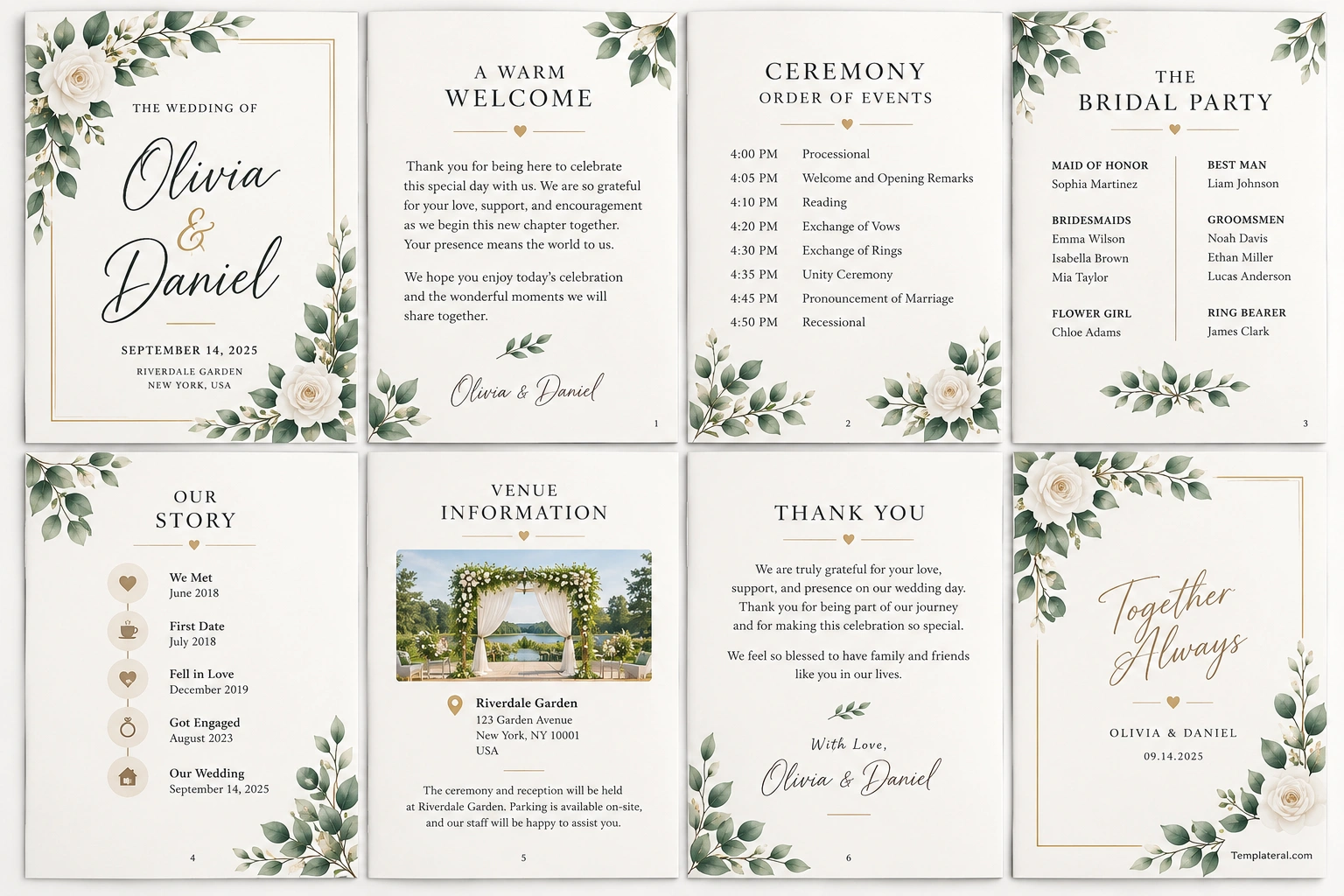
The sample below features an elegant botanical design with soft neutral backgrounds, green foliage, delicate gold accents, and classic typography. Its pages demonstrate a wedding cover, welcome message, ceremony order, bridal party, couple’s story, venue information, and thank-you message.
This wedding booklet sample is suitable as inspiration for garden weddings, romantic celebrations, and elegant ceremonies. You can adapt the layout to suit your own theme, preferred colors, and the amount of information your guests need.
What to Include in a Wedding Booklet
The contents of your wedding booklet should match the style and schedule of your celebration. A short ceremony may need only a few pages, while a full-day wedding with several activities may benefit from a more detailed guide.
1. Wedding Cover Page
The cover introduces the couple and sets the visual tone for the booklet. Keep the layout simple enough for guests to recognize the important details at a glance.
Consider including:
- The couple’s names
- The wedding date
- The ceremony or venue location
- A short phrase or wedding tagline
- Decorative elements that match the wedding theme
Floral illustrations, clean borders, subtle patterns, or elegant typography can create a polished cover without overwhelming the page.
2. Welcome Message
A welcome message gives guests a warm introduction to the celebration. It can thank them for attending, acknowledge their support, and express the couple’s excitement about beginning a new chapter together.
Keep the wording sincere and concise. A few personal sentences are often more meaningful than a long, formal introduction.
3. Ceremony Order and Wedding Program
The ceremony program helps guests understand the sequence of events. It is especially useful for weddings with readings, religious traditions, musical performances, or other special moments.
Depending on the ceremony, you may include:
- Processional and opening remarks
- Readings or musical selections
- Exchange of vows and rings
- Special rituals or cultural traditions
- Pronouncement and recessional
List the events in the correct order and use clear headings so guests can follow along easily. Include explanations for traditions that some guests may not know.
4. Wedding Party and Important Participants
A wedding party page introduces the people who play important roles in the celebration. You can list the maid of honor, best man, bridesmaids, groomsmen, flower girl, ring bearer, and other participants where relevant.
Include names and relationships to the couple if appropriate. Keep the formatting consistent, and confirm the spelling of every name before sending the booklet to print.
5. The Couple’s Story
A short relationship story can make the wedding booklet feel more personal. Share a few milestones, such as how you met, your first date, a memorable trip, or the engagement.
You do not need to tell your entire story. Choose meaningful moments that reflect your relationship and help guests feel connected to the celebration.
6. Venue and Reception Information
Practical details help guests move between locations and understand what to expect after the ceremony. Depending on your event, this section may include the venue address, reception location, parking instructions, accessibility details, and a simple schedule.
If the ceremony and reception take place in different locations, explain the transition clearly. You can also include a map or directions if they will help guests arrive on time.
7. Thank-You Message
A thank-you page allows the couple to express appreciation to family, friends, and everyone who helped make the wedding possible. It may acknowledge guests who traveled to attend, family members who offered support, or people who contributed to the celebration.
Keep the message warm and genuine. A simple expression of gratitude can give the booklet a thoughtful ending.
How to Choose the Right Wedding Booklet Design
The best wedding booklet design complements your wedding theme while keeping the information easy to read. Before choosing colors, fonts, and decorations, consider the atmosphere you want to create.
Elegant and Classic Design
A classic wedding booklet often uses white or cream backgrounds, black typography, and subtle gold or silver accents. Serif fonts, thin borders, and generous spacing can create a timeless appearance.
This style works well for formal ceremonies, traditional weddings, and celebrations with a refined aesthetic.
Floral and Botanical Design
Floral wedding booklets feature leaves, flowers, botanical illustrations, or delicate greenery. Soft green, beige, blush, and cream are popular color choices for a romantic look.
This design is especially suitable for garden weddings, outdoor ceremonies, and nature-inspired celebrations. Keep the decorations around the edges when possible so the main text remains clear.
Modern Minimalist Design
A minimalist wedding booklet uses simple typography, clean lines, limited colors, and plenty of white space. Rather than filling every page with decorations, it focuses on the couple’s names and the information guests need.
This style suits contemporary weddings and couples who prefer a clean, understated presentation.
How to Create and Print a Wedding Booklet
Creating a wedding booklet is easier when you prepare the content before working on the final design. Follow these steps to produce a publication that looks consistent and contains accurate information.
- Step 1: Gather the details. Confirm the couple’s names, wedding date, venue, ceremony order, wedding party, and any messages you want to include.
- Step 2: Choose a template. Select a layout that matches your wedding theme and provides enough room for the content.
- Step 3: Organize the pages. Arrange the cover, welcome message, ceremony program, wedding party, story, venue information, and closing message in a logical order.
- Step 4: Customize the design. Apply your preferred colors, fonts, decorative elements, and approved photographs or illustrations.
- Step 5: Proofread carefully. Check names, dates, addresses, event times, and ceremony details with the people responsible for the wedding.
- Step 6: Prepare the file. Export a print-ready PDF or create a digital version that is easy to read on phones and tablets.
- Step 7: Test before printing. Review the page order, margins, text size, image quality, and fold alignment using a test copy.
Choosing Paper and Printing Options
The paper and printing method can influence the final appearance of your wedding booklet. Choose materials that suit your design, budget, and the way you plan to distribute the publication.
Select the Right Paper
Uncoated paper can provide a soft, natural finish, while smooth coated paper can make colors and images appear more vivid. Cardstock may be suitable for a durable cover, depending on the booklet format and binding method.
Always check the printer’s supported paper weights and request a sample if you are using a professional printing service.
Check Page Size and Layout
Choose the finished booklet dimensions before designing the pages. A folded US Letter sheet, for example, produces a different finished size from a booklet designed around A4 paper. Make sure the page dimensions, margins, and binding method are consistent with your printer’s specifications.
For professionally printed booklets, ask the print provider about bleed, safe margins, page count, and PDF export settings. These requirements help prevent text or decorative elements from being cut off.
Decide Between Printed and Digital Versions
Printed wedding booklets provide guests with a physical keepsake and a convenient ceremony reference. Digital versions are easy to share in advance and can reduce the number of copies you need to print.
You can prepare both formats if your guests have different preferences. A printed booklet can be placed at each seat, while a digital PDF can be shared through a wedding website or invitation email.
Common Wedding Booklet Mistakes to Avoid
A beautiful booklet should also be accurate and practical. Review the design for common issues before distributing it to your guests.
- Too much text: Keep each page focused and remove details that guests do not need.
- Hard-to-read fonts: Avoid tiny text and overly decorative typefaces for important information.
- Incorrect details: Verify names, dates, locations, and ceremony order before printing.
- Inconsistent styling: Use a consistent color palette, typography, and spacing throughout the booklet.
- Low-quality images: Use suitable resolution and check image placement at the final print size.
- Unclear page order: Review the booklet as a complete publication to ensure the pages flow naturally.
Ask a trusted friend, planner, or family member to review the final version. A fresh perspective can help identify mistakes that are easy to overlook when you have been working on the design.
Frequently Asked Questions About Wedding Booklets
What is the purpose of a wedding booklet?
A wedding booklet provides guests with ceremony information, the order of events, details about the wedding party, and other useful information. It can also share the couple’s story and serve as a keepsake from the celebration.
What should a wedding booklet include?
A typical wedding booklet includes a cover, welcome message, ceremony program, wedding party names, venue information, and a thank-you message. You can also add the couple’s story, readings, cultural traditions, or reception details.
How many pages should a wedding booklet have?
The page count depends on the ceremony and the amount of information you want to share. A short program may need only a few pages, while a more detailed wedding booklet can include additional sections about the couple, wedding party, and reception.
What is the difference between a wedding booklet and a wedding program?
A wedding program usually focuses on the ceremony order and participants. A wedding booklet can include those details along with a welcome message, the couple’s story, venue information, and other personalized content.
Can I make a wedding booklet at home?
Yes. You can customize a wedding booklet template and print it using a home printer that supports your chosen paper. Test the layout and folding method before printing the final copies.
What paper is best for a wedding booklet?
The best paper depends on the design and printing method. Uncoated paper offers a natural feel, coated paper can enhance color reproduction, and a heavier cover stock can provide extra durability. Check the print provider’s recommendations before ordering.
Should I create a digital wedding booklet?
A digital wedding booklet is useful for sharing information before the wedding and reaching guests who prefer electronic documents. A printed version is helpful during the ceremony and can serve as a keepsake. Offering both is a practical option.
Create a Wedding Booklet That Guests Will Treasure
A thoughtfully designed wedding booklet combines practical information with personal details that reflect the couple’s story. From the ceremony order and wedding party to venue directions and a heartfelt thank-you message, each section can help guests feel informed and included.
Start with a wedding booklet template that matches your theme, organize the content clearly, and check every detail before printing. Whether you choose a classic, botanical, or minimalist design, a well-prepared booklet can make your celebration feel more organized and give guests a meaningful reminder of your special day.
Download: Wedding Booklet Template
