A brochure is a practical marketing and information tool designed to present important details in a clear, organized, and visually appealing format. Businesses, schools, nonprofits, event organizers, real estate professionals, and service providers can use brochures to introduce an organization, explain services, promote products, or provide useful information to an audience.
Unlike a simple flyer, a brochure typically provides more room for structured information while still being easy to read and distribute. A well-designed brochure combines concise text, attractive visuals, headings, and calls to action to help readers understand the message quickly.
Whether you need a company brochure, product brochure, service brochure, event brochure, or informational brochure, starting with a well-organized layout can make the design process much easier.
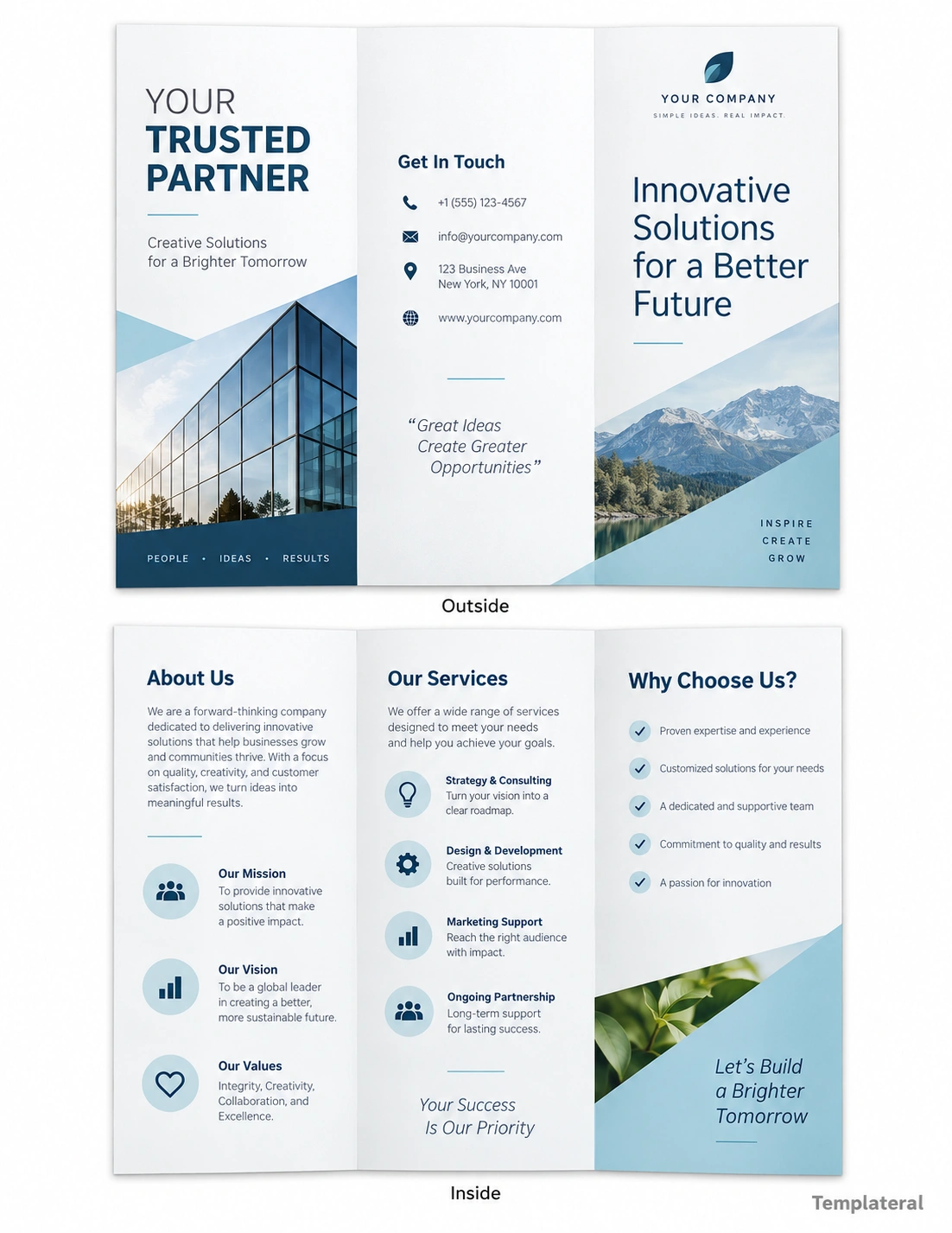
What Is a Brochure?
A brochure is a printed or digital document that communicates information about a business, organization, product, service, event, or specific topic. Brochures are usually divided into several sections or panels so readers can scan the information without having to read a large block of text.
Common brochure formats include bi-fold and tri-fold designs. A tri-fold brochure, for example, divides a sheet into three panels and provides separate areas for a cover, introduction, services, features, contact information, and other content.
Brochures can be distributed in offices, stores, trade shows, schools, conferences, community events, waiting rooms, and other locations where printed information can reach a specific audience.
What Is a Brochure Used For?
The purpose of a brochure depends on the organization and audience. Some brochures are primarily promotional, while others focus on education or providing useful information.
Business Promotion
Businesses can use brochures to introduce their company, explain their services, highlight their advantages, and provide contact information. A professional company brochure can also help create a consistent visual identity across marketing materials.
Product Marketing
A product brochure can showcase important product features, specifications, benefits, pricing information, and purchasing instructions. Product images and short descriptions can help readers quickly understand what is being offered.
Service Information
Service providers can use brochures to explain what they offer and how customers can get started. Examples include consulting services, construction companies, healthcare organizations, educational services, repair businesses, and professional agencies.
Events and Organizations
Event brochures can provide schedules, locations, speakers, activities, registration information, and contact details. Nonprofit and community organizations can also use brochures to explain their mission, programs, and ways people can participate.
Common Types of Brochures
There are many different types of brochures, and the best format depends on the amount of information and the purpose of the document.
- Company brochure: Introduces a business, its mission, services, and contact information.
- Product brochure: Highlights product features, specifications, benefits, and purchasing information.
- Service brochure: Explains professional services and what customers can expect.
- Real estate brochure: Presents property features, photographs, specifications, and contact information.
- Event brochure: Provides event schedules, activities, speakers, locations, and registration details.
- Travel brochure: Promotes destinations, attractions, accommodations, and activities.
- Educational brochure: Presents useful information about a topic in an easy-to-read format.
- Nonprofit brochure: Explains an organization’s mission, programs, achievements, and opportunities for support.
Brochure Layout Ideas
A good brochure layout should guide the reader naturally from the most important message to supporting information and finally toward a clear action.
Front Cover
The front cover should immediately communicate what the brochure is about. Include a short headline, relevant image or graphic, organization or business name, and a clean visual hierarchy.
Introduction Section
The introduction can provide a brief explanation of the business, product, service, organization, or topic. Keep this section concise so readers can understand the main message quickly.
Features and Benefits
Use short sections or bullet points to explain important features and benefits. Breaking information into smaller sections makes a brochure easier to scan.
Contact and Call to Action
The final section should tell readers what to do next. Depending on the purpose of the brochure, the call to action might encourage readers to visit a website, call a business, request a quote, register for an event, or learn more about a service.
What to Include in a Brochure
The content of a brochure should match its purpose and audience. However, many effective brochures include several common elements.
- A clear title or headline
- Business or organization name
- Short introduction
- Relevant images or graphics
- Product or service descriptions
- Key features and benefits
- Important statistics or facts when appropriate
- Contact information
- Website or social media information
- A clear call to action
Avoid trying to place every available piece of information into a single brochure. The goal is to provide enough information to interest and inform the reader while keeping the document visually balanced.
How to Create an Effective Brochure
1. Define Your Purpose
Before designing a brochure, determine exactly what you want the document to accomplish. A brochure designed to promote a product will have different content from one designed to explain an organization’s services.
2. Identify Your Audience
Think about who will read the brochure. The language, imagery, layout, and amount of technical information should be appropriate for the intended audience.
3. Organize the Content
Create a simple content structure before working on the visual design. Decide which information belongs on the cover, inside panels, and final section.
4. Use a Clear Visual Hierarchy
Headings should stand out from supporting text, while important information should be easy to locate. Consistent typography, spacing, alignment, and section sizes can make the brochure easier to navigate.
5. Choose Appropriate Images
Images should support the message rather than simply fill empty space. Use relevant photographs, illustrations, icons, or graphics that reinforce the subject of the brochure.
6. Add a Strong Call to Action
Make the desired next step obvious. A concise call to action can help turn a reader’s interest into an inquiry, visit, registration, purchase, or other response.
Tips for Designing a Printable Brochure
If the brochure will be printed, consider both design and physical production from the beginning.
- Use a high-resolution design suitable for printing.
- Keep important text away from trim and fold areas.
- Choose fonts that remain readable at the final printed size.
- Maintain consistent margins and spacing.
- Use a limited color palette that matches the brand.
- Check image quality before exporting the final file.
- Proofread all contact information and important details.
- Print a test copy before producing a large quantity.
Brochure vs. Flyer
Brochures and flyers are both useful printed marketing materials, but they serve somewhat different purposes. A flyer is commonly designed around a single sheet with a relatively direct message. A brochure typically provides more structured information through multiple panels or sections.
A flyer may be suitable for announcing a sale, event, opening, or limited-time promotion. A brochure can be more appropriate when the reader needs additional information about a company, product, service, destination, or organization.
Why Use a Brochure Template?
Creating a brochure from a blank page can take considerable time because you need to plan the layout, spacing, typography, sections, and visual hierarchy. A brochure template provides a starting structure that can be customized for your specific needs.
A template can help you organize content more efficiently while maintaining a professional appearance. You can replace placeholder text, change colors, add your own images, and adjust sections to match your brand or project.
Templates are particularly useful when you need to create multiple brochures with a consistent visual style.
Brochure Design Checklist
Before printing or sharing your brochure, review the design and content carefully.
- Is the purpose of the brochure immediately clear?
- Is the headline easy to understand?
- Is the information organized into logical sections?
- Are headings and body text easy to read?
- Do the images support the subject?
- Is the contact information accurate?
- Is there a clear call to action?
- Are important elements positioned safely away from folds and edges?
- Has the brochure been proofread?
- Has a test print been reviewed before final production?
Final Thoughts
A well-designed brochure can communicate a large amount of useful information without overwhelming the reader. The most effective designs combine a clear purpose, concise writing, organized sections, strong visual hierarchy, and relevant imagery.
Whether you are creating a company brochure, product brochure, service brochure, event brochure, or informational handout, starting with a structured template can simplify the design process. Focus on your audience, prioritize the most important information, and make the next step clear. With thoughtful planning, a brochure can become a practical and professional communication tool for both print and digital use.
Download: Brochure Template
