A check register is a simple record used to track transactions made from a checking account. It can help you keep track of checks, deposits, withdrawals, payments, and the running account balance in one organized place.
Although many people now manage their accounts through online banking, a check register can still be useful for maintaining a personal record of transactions. Writing down transactions as they occur can make it easier to identify spending, reconcile an account, and understand how individual transactions affect the available balance.
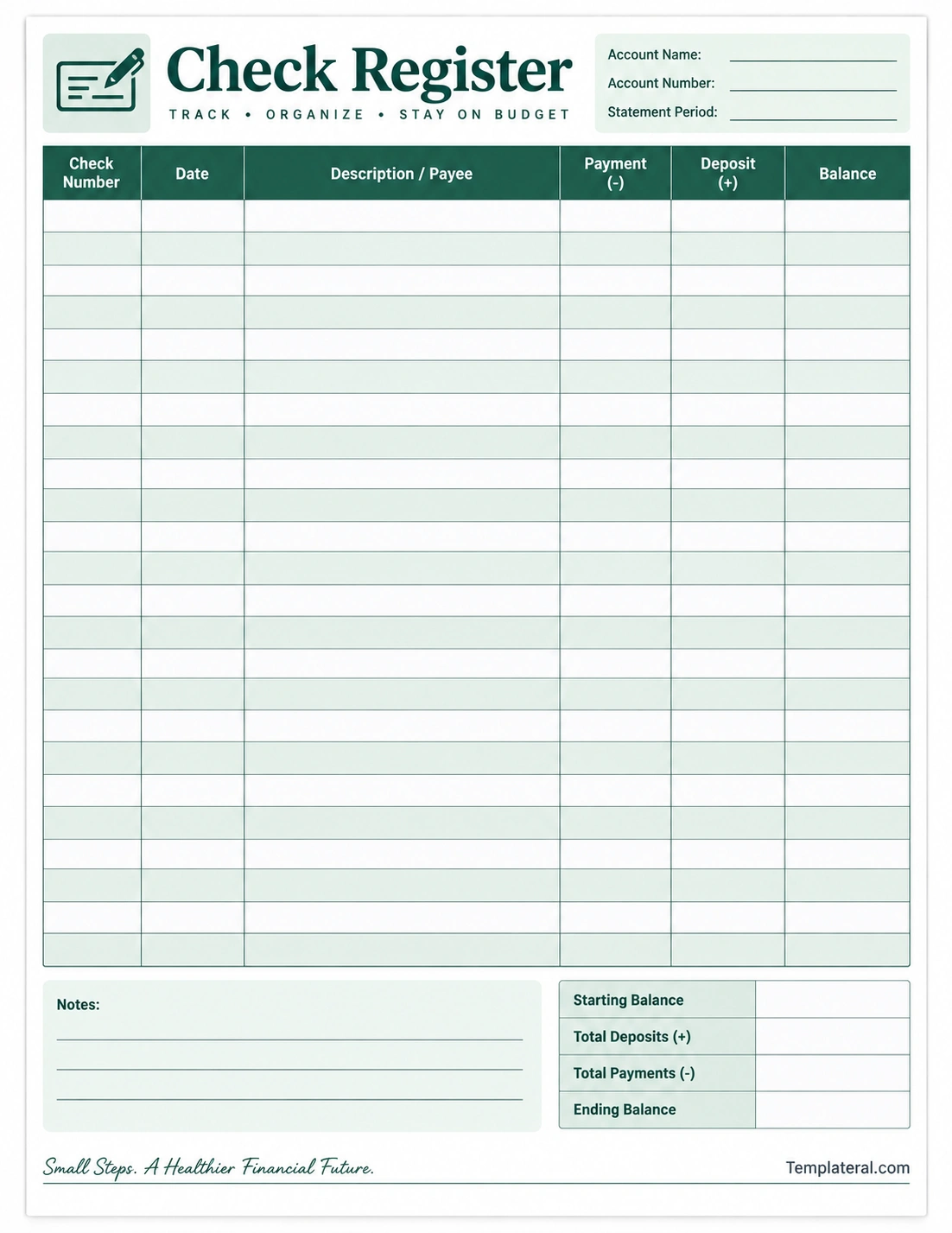
A printable check register template provides a convenient structure for recording this information. With clearly labeled columns for dates, descriptions, payments, deposits, and balances, you can maintain a consistent transaction log without creating the layout from scratch.
What Is a Check Register?
A check register is a transaction record traditionally used to keep track of activity in a checking account. Each transaction is entered into a row so the account holder can maintain a running record of money coming in and going out.
A traditional register may be included with a checkbook, but a printable check register can also be created as a standalone worksheet. It can be kept in a folder, binder, planner, or financial organization system.
The basic purpose is straightforward: record each transaction, update the balance, and use the record to compare your entries with the account information provided by your financial institution.
What Is a Check Register Used For?
A check register can serve several practical purposes when managing everyday account activity.
Tracking Payments
Record checks, electronic payments, automatic withdrawals, debit transactions, or other account activity in the appropriate row. This creates a chronological history of transactions.
Recording Deposits
Deposits and other incoming funds can be recorded separately from payments. This makes it easier to see how money entering the account affects the running balance.
Maintaining a Running Balance
After recording each transaction, update the balance. A running balance provides a simple way to estimate the amount remaining based on the transactions you have entered.
Reviewing Spending
Because transactions are recorded individually, a register can help you review where money is being spent. You can use the description column to categorize or identify recurring payments and other expenses.
Common Check Register Columns
A printable check register can contain several columns depending on how much detail you want to record.
- Check number: Identifies a check when applicable.
- Date: Records the date of the transaction.
- Description or payee: Identifies where the payment went or describes the transaction.
- Payment: Records money leaving the account.
- Deposit: Records money added to the account.
- Balance: Shows the running balance after the transaction.
- Notes: Provides additional space for reminders or transaction details.
Not every transaction requires every field. The goal is to create a system that records the information you need in a consistent way.
How to Use a Check Register
Using a check register is relatively simple once you establish a consistent routine.
1. Enter the Starting Balance
Begin by recording the account balance you are using as the starting point. This gives you a reference value for calculating subsequent balances.
2. Record Each Transaction
Whenever money enters or leaves the account, add the transaction to the next available row. Include the date and a clear description so you can identify it later.
3. Enter Payments and Deposits
Place outgoing amounts in the payment column and incoming amounts in the deposit column. Keeping these amounts separate makes the register easier to review.
4. Update the Balance
Calculate the new balance after each transaction. For an outgoing transaction, subtract the amount from the previous balance. For an incoming transaction, add it to the previous balance.
5. Review the Register Regularly
Compare your entries with your account activity periodically. If something does not match, review the dates, descriptions, and amounts to locate the discrepancy.
Check Register Example
Suppose a checking account begins with a balance of $1,000. A payment of $75 is recorded, followed by a deposit of $250. The register can show the transactions in chronological order and update the balance after each entry.
- Starting balance: $1,000
- Payment: $75
- Updated balance: $925
- Deposit: $250
- Updated balance: $1,175
The example demonstrates the basic principle of a running balance. In an actual register, you would record the date and description for each transaction as well.
Benefits of Using a Check Register
A check register is a simple organizational tool that can make transaction tracking more systematic.
- Improved organization: Transactions are kept in chronological order.
- Better visibility: Payments and deposits can be reviewed in one place.
- Easier reconciliation: Recorded transactions can be compared with account activity.
- Spending awareness: Reviewing transaction descriptions can help you understand spending patterns.
- Useful record keeping: A register provides a personal transaction history.
- Flexible format: A printable worksheet can be customized to your preferred tracking system.
Check Register vs. Bank Statement
A check register and a bank statement serve different purposes. A check register is a record maintained by the account holder, while a bank statement is an account activity record provided by the financial institution.
Your register can contain transactions that you have recorded before they appear in a statement or online account history. For this reason, the running balance in your personal register may differ temporarily from the balance displayed by your financial institution.
Regularly comparing the two records can help identify transactions that have not yet cleared, missing entries, duplicate entries, or other differences.
Tips for Keeping an Accurate Check Register
Record Transactions Promptly
Enter transactions as soon as practical rather than relying on memory. Prompt recording reduces the chance of forgetting smaller purchases or recurring payments.
Use Clear Descriptions
Write descriptions that will still make sense later. Instead of using vague notes such as “payment,” identify the merchant, bill, or purpose when appropriate.
Check Amounts Carefully
A small entry error can affect every subsequent balance. Double-check the amount before moving to the next transaction.
Keep the Register Consistent
Use the same method for recording payments, deposits, dates, and descriptions. Consistency makes the worksheet easier to understand when reviewing older entries.
Review Recurring Transactions
Regular payments such as subscriptions, utilities, memberships, or other recurring charges can be easy to overlook. Recording them in the register helps maintain a complete transaction history.
Printable Check Register Template
A printable check register template can be useful for people who prefer writing transactions by hand. Instead of drawing a table each time, you can print multiple copies and keep them together in a financial planner or binder.
A well-designed template should provide enough writing space without making the page unnecessarily complicated. Essential columns such as date, description, payment, deposit, and balance should be easy to identify.
You can also use a digital version of the same structure in a spreadsheet or note-taking application if you prefer electronic record keeping.
Check Register for Personal Budgeting
A check register is not a complete budgeting system, but it can complement a personal budget. The register focuses primarily on individual account transactions, while a budget generally looks at expected income, expenses, savings, and financial goals over a broader period.
Using both can provide different perspectives. The budget shows what you plan to spend, while the register provides a transaction-by-transaction record of account activity.
How to Organize a Check Register
For ongoing use, choose a system that is easy to maintain. You might organize registers by month, statement period, account, or another period that fits your record-keeping routine.
- Keep completed pages together in chronological order.
- Label each page with the relevant account or period.
- Use consistent descriptions for recurring transactions.
- Review unfinished entries before starting a new page.
- Store completed records securely if you need them for future reference.
Check Register Checklist
Before considering a register complete, review the following items:
- Is the starting balance recorded?
- Has each transaction been entered?
- Are dates correct?
- Are payment and deposit amounts in the correct columns?
- Are descriptions clear enough to identify transactions?
- Has the running balance been updated after each entry?
- Have the entries been compared with account activity periodically?
- Have discrepancies been investigated?
Final Thoughts
A check register provides a straightforward way to organize checking account transactions and maintain a running record of payments, deposits, and balances. While digital banking provides convenient access to account information, a personal register can offer an additional layer of organization and visibility.
Whether you use a printable worksheet, checkbook register, spreadsheet, or digital note-taking system, consistency is the most important part. Record transactions accurately, update the balance regularly, and review your entries against your account activity.
A simple check register template can make this process easier by providing a clean structure for recording everyday transactions without requiring you to design a tracking sheet from scratch.
Download: Check Register Template
