A clear format of project plan helps turn a project idea into an organized set of goals, tasks, timelines, resources, and responsibilities. Whether you are managing a business initiative, school assignment, marketing campaign, construction project, or personal project, a structured plan makes it easier to understand what needs to be done and when.
A good project plan should be detailed enough to guide the work but simple enough to update as the project develops. By using the right project plan format, you can define the project scope, assign responsibilities, track milestones, identify risks, and keep everyone working toward the same objectives.
What Is the Format of a Project Plan?
The format of a project plan is the structure used to organize essential project information in one document. It typically explains the project’s purpose, objectives, scope, tasks, schedule, resources, milestones, risks, and expected outcomes.
Although project plans can vary depending on the size and type of project, most effective formats contain several core sections. These sections create a practical roadmap that project managers and team members can use throughout the project lifecycle.
Common Sections in a Project Plan
- Project information: Basic details such as the project name, manager, team, start date, and target completion date.
- Project purpose: A brief explanation of why the project is being undertaken.
- Objectives: Specific results the project is expected to achieve.
- Scope: A description of what is included and excluded from the project.
- Tasks and timeline: The activities required to complete the project and their expected dates.
- Milestones: Important checkpoints or achievements during the project.
- Resources: People, tools, software, facilities, and other resources required.
- Risks and mitigation: Potential problems and strategies for reducing their impact.
- Notes and next steps: Additional information, decisions, follow-up actions, or reminders.
Key Elements of an Effective Project Plan Format
A project plan should provide enough information to support planning and execution without becoming unnecessarily complicated. The following elements form the foundation of a useful project planning document.
1. Project Details
Begin with basic project information. Include the project name, project manager, team members, start date, target end date, and other identifying information that helps readers understand the project at a glance.
This section is especially useful when an organization manages multiple projects at the same time. Clear identification reduces confusion and makes the document easier to reference.
2. Project Purpose
The project purpose explains why the project exists. Keep this section concise and focused on the problem, opportunity, or business need that the project addresses.
For example, a website redesign project might have a purpose of improving website usability, modernizing the user experience, and supporting business growth.
3. Project Objectives
Objectives describe the specific outcomes the project should achieve. Strong objectives are clear, measurable, and connected to the project’s overall purpose.
Instead of writing a vague objective such as “improve the website,” a more useful objective might be “redesign the website navigation to make key product information easier to find.”
4. Project Scope
The scope section defines the boundaries of the project. Clearly separating included and excluded work can help prevent scope creep and misunderstandings.
Consider dividing the scope into two categories:
- In scope: Work, deliverables, features, or activities that are part of the project.
- Out of scope: Work or requirements that are intentionally excluded.
Defining scope early gives the project team a shared understanding of what the plan covers.
How to Structure the Project Tasks and Timeline
The task and timeline section is one of the most practical parts of a project plan. It translates project objectives into actionable work.
A simple project plan format can use a table with columns such as task number, task or activity, description, start date, end date, duration, and status.
Break the Project Into Manageable Tasks
Large objectives can be difficult to manage when they are treated as a single activity. Break them into smaller tasks that can be assigned, scheduled, and tracked.
For each task, consider documenting:
- The name of the task
- A short description
- The person or team responsible
- The planned start date
- The planned completion date
- The expected duration
- The current status
Breaking work into smaller activities also makes it easier to identify delays and dependencies before they affect the entire project.
Use Clear Status Indicators
A project plan can include simple status categories such as Not Started, In Progress, On Track, At Risk, Delayed, Completed, On Hold, or Cancelled.
Consistent status labels make it easier to review project progress quickly. If the plan is maintained digitally, status fields can also be combined with filters or conditional formatting.
Why Milestones Matter in a Project Plan
Milestones represent significant points in the project rather than everyday tasks. They can indicate the completion of an important phase, approval of a deliverable, or achievement of a major objective.
A milestone section can include the milestone name, target date, and current status. Keeping milestones visible helps project managers focus on major outcomes instead of tracking only individual activities.
For example, a product development project might use milestones such as requirements approved, prototype completed, testing finished, and final launch.
Including Resources in the Project Plan
Projects require resources to move from planning to execution. A useful project plan format should identify the resources needed to complete the work.
Resources may include:
- Team members and specialized skills
- Software and technology
- Equipment and facilities
- Materials and supplies
- Budget or other financial resources
- External vendors or service providers
Listing resources early can reveal potential constraints. If an essential resource is unavailable, the project schedule may need to be adjusted before work begins.
Adding Risk Management to Your Project Plan
Every project has potential risks. A project plan should identify important risks and document how the team intends to respond to them.
A simple risk management section can include the risk, potential impact, and mitigation plan.
Examples of Common Project Risks
- Important tasks taking longer than expected
- Limited staff availability
- Changes in project requirements
- Technical problems
- Supplier or vendor delays
- Communication gaps between team members
- Unexpected dependencies
The purpose of documenting risks is not to predict every possible problem. Instead, it helps the team think ahead and prepare practical responses to issues that could affect project objectives.
How to Use a Project Plan Template
A project plan template provides a reusable structure that can save time when starting a new project. Rather than creating every section from scratch, you can begin with a standard format and customize it for the project’s requirements.
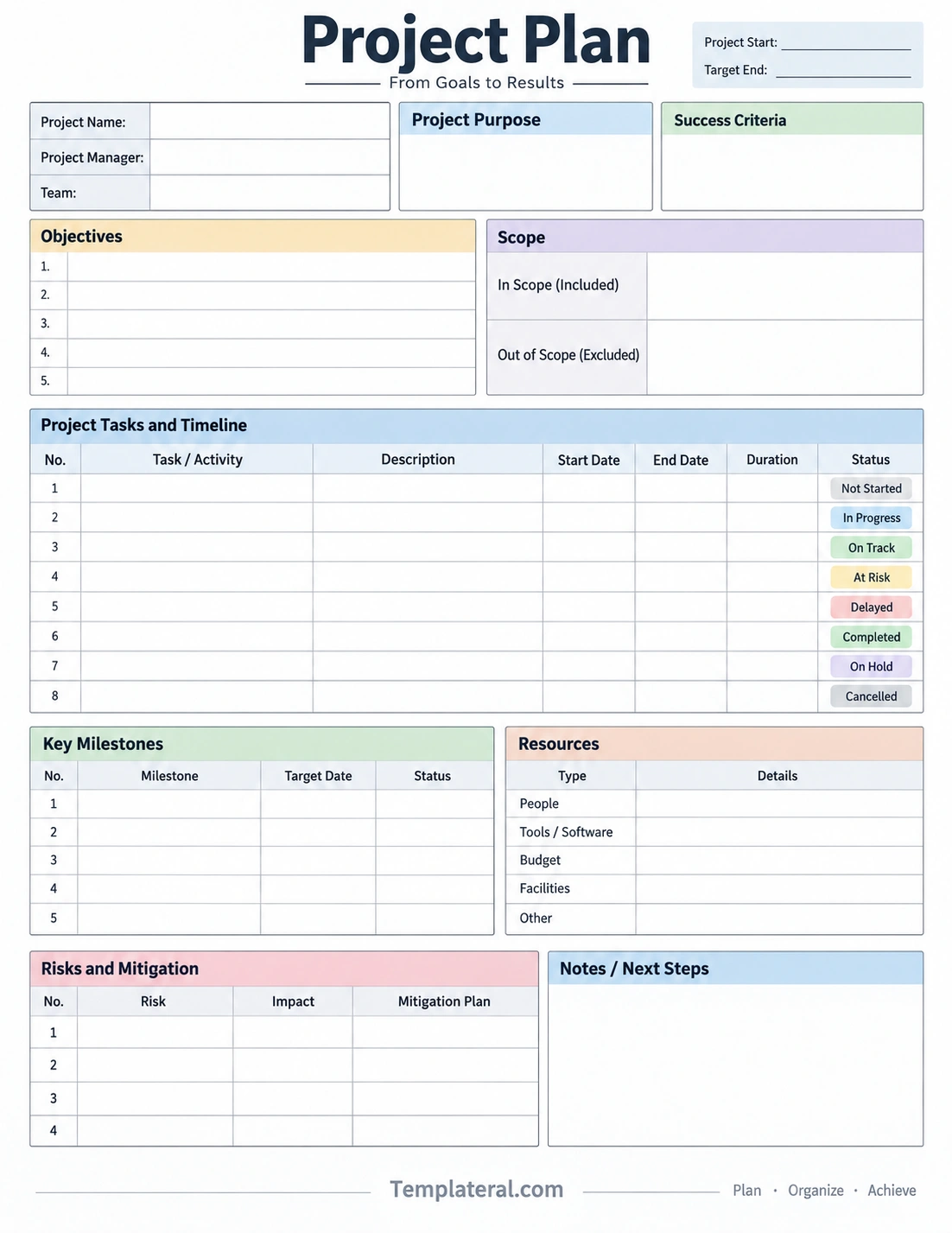
Start by completing the project details, purpose, objectives, and scope. Next, list the tasks and establish the timeline. Add important milestones, required resources, and known risks. Finally, review the plan with the relevant team members before project execution begins.
A template can also be updated throughout the project. It should be treated as a working document rather than a static file that is created once and never revisited.
Tips for Creating a Better Project Plan
Keep the Format Easy to Read
A complicated project plan can become difficult to maintain. Use clear headings, short descriptions, consistent terminology, and organized tables. Readers should be able to locate important information quickly.
Make Responsibilities Clear
Whenever possible, connect tasks to the people or teams responsible for completing them. Clear ownership reduces uncertainty and makes follow-up easier.
Set Realistic Dates
Project schedules should account for dependencies, reviews, approvals, and potential delays. Avoid creating a timeline that looks efficient but leaves no room for reasonable adjustments.
Review the Plan Regularly
Projects can change after work begins. Review the project plan at appropriate intervals and update dates, task statuses, risks, milestones, and next steps when circumstances change.
Focus on Actionable Information
Every section should serve a practical purpose. Avoid filling the project plan with unnecessary information that does not help the team make decisions, complete tasks, or track progress.
When Should You Create a Project Plan?
A project plan is most useful before significant project work begins, but planning should continue throughout the project. Creating the initial plan helps establish expectations, responsibilities, timelines, and project boundaries.
For larger projects, the plan may require several rounds of review before execution. Smaller projects may only need a one-page format that summarizes the most important information.
The appropriate level of detail depends on project complexity, team size, risk level, duration, and stakeholder requirements.
Format of Project Plan: Simple Checklist
Before finalizing your project plan, use this checklist to make sure the essential information is covered:
- Project name and basic information are clearly identified.
- The project purpose is easy to understand.
- Objectives describe specific expected outcomes.
- The project scope defines included and excluded work.
- Major tasks are listed in a logical order.
- Start and completion dates are established.
- Important milestones have target dates.
- Required resources are identified.
- Major risks and mitigation strategies are documented.
- Current status and next steps can be updated easily.
Conclusion
The right format of project plan provides a practical framework for turning project goals into organized action. By including project details, purpose, objectives, scope, tasks, timelines, milestones, resources, and risks, a project plan gives the team a shared reference point from project initiation through completion.
The best format is not necessarily the longest or most complicated one. It is the format that gives the people involved enough information to understand the work, track progress, manage risks, and make informed decisions. Start with the essential sections, customize the structure to your project, and keep the plan updated as the work progresses.
A well-structured project plan can make complex work easier to organize and provides a clear roadmap for moving from initial goals to measurable results.
Download: Project Plan Template
