Keeping track of monthly bills can be difficult when you have several due dates, payment amounts, and recurring expenses to remember. A monthly bill tracker provides a simple way to record your bills, monitor payment status, and keep important information organized in one place.
Instead of relying on memory or searching through different statements, you can use a bill tracker to create a clear overview of your recurring payments. A printable worksheet can be especially useful if you prefer a simple system that you can write on and review throughout the month.
Whether you are tracking household expenses, subscriptions, utilities, insurance, or other recurring payments, a monthly bill tracker can help turn bill management into a consistent routine.
What Is a Monthly Bill Tracker?
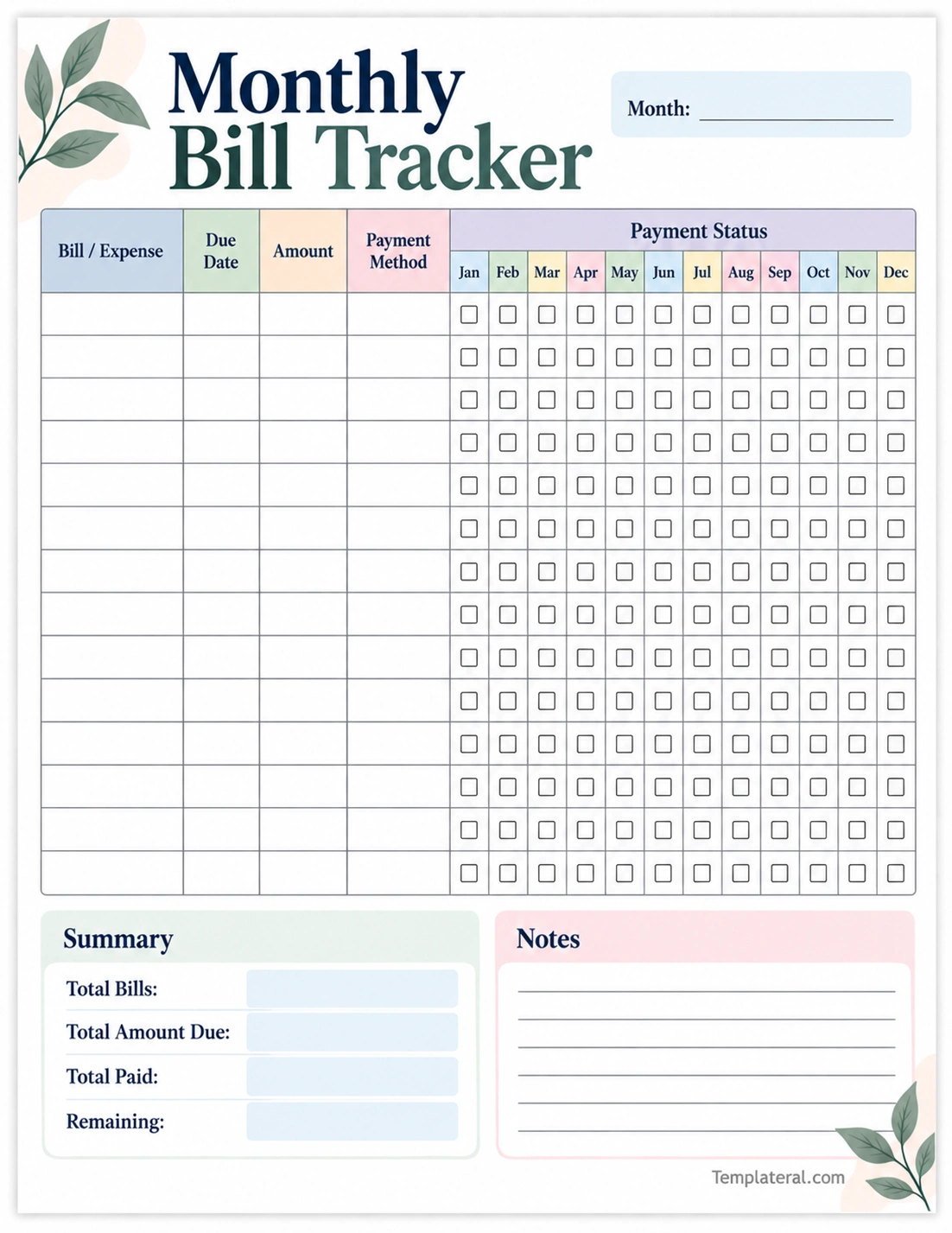
A monthly bill tracker is a worksheet or digital tool used to record and monitor bills during the month. It gives you a central place to keep information such as bill names, due dates, expected amounts, payment methods, and payment status.
The main purpose is to make recurring payments easier to see and manage. Instead of keeping payment information in several different places, you can use one organized tracker as a monthly reference.
A basic monthly bill tracker may include:
- Bill or expense: The name of the recurring payment.
- Due date: When the payment is expected.
- Amount: The expected cost of the bill.
- Payment method: How the payment will be made.
- Payment status: Whether the bill has been paid.
- Notes: Space for reminders or additional details.
Why Use a Monthly Bill Tracker?
Regular bills may be predictable, but managing several payment dates can still become confusing. A bill tracking worksheet provides a simple visual system for keeping these payments organized.
Keep All Bills in One Place
One of the biggest advantages of a monthly bill tracker is having important payment information together. You can record recurring household expenses on one worksheet instead of keeping separate lists for different bills.
This makes it easier to review your monthly obligations and identify payments that still need attention.
Track Due Dates
Recording due dates helps you see when payments are scheduled. This is especially useful when several bills are due during the same week.
You can arrange your information chronologically or use a calendar alongside your tracker to make upcoming payment dates easier to review.
Monitor Payment Status
A payment status column gives you a simple way to mark bills as paid. Once a payment is complete, check the appropriate box or update the status.
This can help prevent uncertainty about whether a particular bill has already been handled.
Understand Recurring Expenses
Tracking your regular bills can also give you a clearer picture of recurring household expenses. Reviewing the amounts over time can help you notice changes in utilities, subscriptions, insurance, or other regular payments.
What Should Be Included in a Monthly Bill Tracker?
A useful bill tracker does not need to be complicated. The best format includes the information you need to understand and manage your recurring payments.
Bill or Expense Name
Start by listing the name of each bill. Common examples include rent, electricity, water, internet, phone services, insurance, subscriptions, and memberships.
Due Date
Record the expected due date for each payment. Having the dates together makes it easier to identify which bills are approaching.
Amount Due
Add the expected amount for each bill. Fixed expenses are usually easy to record, while variable expenses can be entered using an estimate and updated when the actual bill arrives.
Payment Method
Adding the payment method can provide useful information about how each bill is handled. You can note automatic payment, bank transfer, debit account, or another payment method.
Payment Status
A checkbox or status field allows you to indicate whether the bill has been paid. This turns the worksheet into both a bill tracker and a payment checklist.
Notes
Use the notes section for reminders, billing changes, unusual charges, subscription information, or anything else you want to remember.
How to Use a Monthly Bill Tracker
Using a monthly bill tracker is simple. The key is to update it consistently so the information remains useful throughout the month.
1. Make a List of Your Regular Bills
Start by listing your recurring payments. Review previous bills, statements, subscriptions, and household expenses to create a complete list.
Your list might include:
- Rent or housing payments
- Electricity and utilities
- Internet and phone services
- Insurance
- Streaming services
- Memberships
- Other recurring household expenses
2. Add the Due Dates
Record the due date for every bill. If you have many recurring payments, organizing them by date can make the tracker easier to review.
3. Record the Expected Amount
Enter the amount you expect to pay. For variable bills, use the most recent amount or an estimated figure and update it when the current statement is available.
4. Record the Payment Method
Add the payment method if it helps you manage your bills. This can make it easier to distinguish between automatic payments and bills that require manual action.
5. Mark Each Bill as Paid
After completing a payment, immediately mark it as paid. Updating the tracker right away makes the worksheet more accurate and reduces the need to remember what you have already paid.
6. Review the Tracker
Review your tracker regularly during the month. Look for upcoming due dates, unpaid bills, and amounts that have changed from your expectations.
Monthly Bill Tracker vs. Bill Organizer
A monthly bill tracker and a bill organizer are closely related, but they can serve slightly different purposes.
A monthly bill tracker generally focuses on recording and monitoring bills during a particular month. It is useful when you want to know what needs to be paid, how much is due, and which payments have already been completed.
A bill organizer can have a broader purpose. It may include recurring payment information, account details, due dates, notes, and other organizational information that you want to maintain over a longer period.
For many households, either format can work. The important part is having a system that is simple enough to update regularly.
Printable Monthly Bill Tracker Benefits
A printable monthly bill tracker is a convenient option for people who prefer handwritten planning. You can print a new worksheet at the beginning of each month and keep it in a planner, folder, or designated household organization area.
Some practical benefits include:
- Easy to see: Your recurring bills can be displayed on one physical page.
- Simple to update: Write changes directly on the worksheet.
- No complicated setup: You can start using a blank tracker immediately.
- Easy to review: Look over your bills without opening an app or spreadsheet.
- Useful for recordkeeping: Completed worksheets can be kept for future reference if needed.
Tips for Better Monthly Bill Tracking
A tracker is most effective when it becomes part of a regular routine. These simple habits can make monthly bill management easier.
- Prepare your tracker early: Add known recurring bills before the month begins.
- Review bills regularly: Check upcoming payments throughout the month.
- Update changes immediately: Record new amounts or changed due dates when you notice them.
- Mark payments right away: Update the payment status after completing each bill.
- Separate fixed and variable expenses: This can make changing bill amounts easier to identify.
- Keep your tracker accessible: Store it somewhere you will naturally see it during your monthly routine.
- Use digital reminders when appropriate: Calendar notifications can complement your physical tracking system.
How to Organize Bills by Due Date
Organizing bills by due date can make a monthly bill tracker easier to use. Start by identifying the earliest payment date and continue through the end of the month.
If multiple bills have the same due date, list them together or use separate rows for each expense. This prevents several payments from being combined into one unclear entry.
You can also divide bills into weekly groups. For example, you might review bills due during the first, second, third, and fourth weeks of the month.
This approach provides a simple way to identify periods when several payments are scheduled close together.
How a Monthly Bill Tracker Can Support Budget Planning
A bill tracker is not the same as a complete budget, but the two tools can work together. A budget typically covers income, spending, savings, and financial goals, while a bill tracker focuses on recurring payments.
By recording expected bill amounts, you can see how much of your monthly spending is associated with regular obligations. This information can then be considered when planning other expenses.
Reviewing your tracker can also help you identify recurring costs that have changed. For example, if a subscription or utility bill increases, you can update the amount and take the change into account when preparing future monthly plans.
Who Can Use a Monthly Bill Tracker?
A monthly bill tracker can be useful for anyone who manages recurring payments.
- Families: Track household bills and recurring expenses.
- Couples: Maintain a shared overview of regular payments.
- Students: Organize rent, utilities, subscriptions, and other expenses.
- Renters: Keep housing and household bills organized.
- Homeowners: Track utilities, insurance, services, and other recurring costs.
- Busy households: Keep multiple payment dates and amounts in one place.
Frequently Asked Questions About Monthly Bill Trackers
What is a monthly bill tracker?
A monthly bill tracker is a worksheet or digital tool used to record bills, due dates, amounts, payment methods, and payment status. It provides a central place to monitor recurring monthly payments.
How do I make a monthly bill tracker?
Start by listing your recurring bills. Add the due date, expected amount, payment method, and a checkbox or status field for each payment. You can use a printable worksheet, spreadsheet, planner, or digital tracking tool.
What bills should I include in a monthly bill tracker?
You can include recurring payments such as rent, utilities, internet, phone services, insurance, subscriptions, memberships, and other regular household expenses.
Can I use a printable monthly bill tracker?
Yes. A printable tracker can be used as a simple monthly worksheet. You can write down your bills, update payment amounts, and mark payments as completed by hand.
How often should I update my bill tracker?
It is useful to review your tracker regularly throughout the month. Update it whenever a payment is made, a bill changes, or a new recurring expense is added.
Can a monthly bill tracker replace a budget?
No. A bill tracker and a budget serve different purposes. A tracker focuses on recurring payments, while a budget provides a broader overview of income, spending, savings, and financial goals.
Should I track automatic payments?
Yes. Automatic payments can still be included so you have a complete record of recurring bills. You can mark them as paid after confirming that the payment was processed.
Can I use a bill tracker for variable expenses?
Yes. Record an estimated amount when necessary and update the tracker once the actual bill is available. This can be useful for expenses such as utilities that change from month to month.
Final Thoughts
A monthly bill tracker provides a straightforward way to organize recurring payments and keep track of what has been paid. By recording bill names, due dates, amounts, payment methods, and payment status, you can create a clear monthly reference for your regular expenses.
The best tracking system is one that you can maintain consistently. Prepare your tracker regularly, update it when information changes, and mark payments as soon as they are completed. Whether you prefer a printable worksheet or a digital bill tracker, a simple routine can make monthly bill organization easier to manage.
Download: Monthly Bill Tracker Template
