Keeping accurate records of payments can make everyday financial organization much easier. Whether you are tracking household bills, recurring expenses, personal payments, or other transactions, a payment log provides a simple place to record what was paid, when it was paid, how much was paid, and how the payment was made.
Without a consistent record, it can be difficult to remember when a payment was completed or find important details later. A printable payment log gives you a straightforward system for recording payment information as transactions happen.
A payment log can be used as a standalone worksheet or alongside a budget planner, bill organizer, or monthly expense tracker. The goal is simple: create a clear record that is easy to update and review.
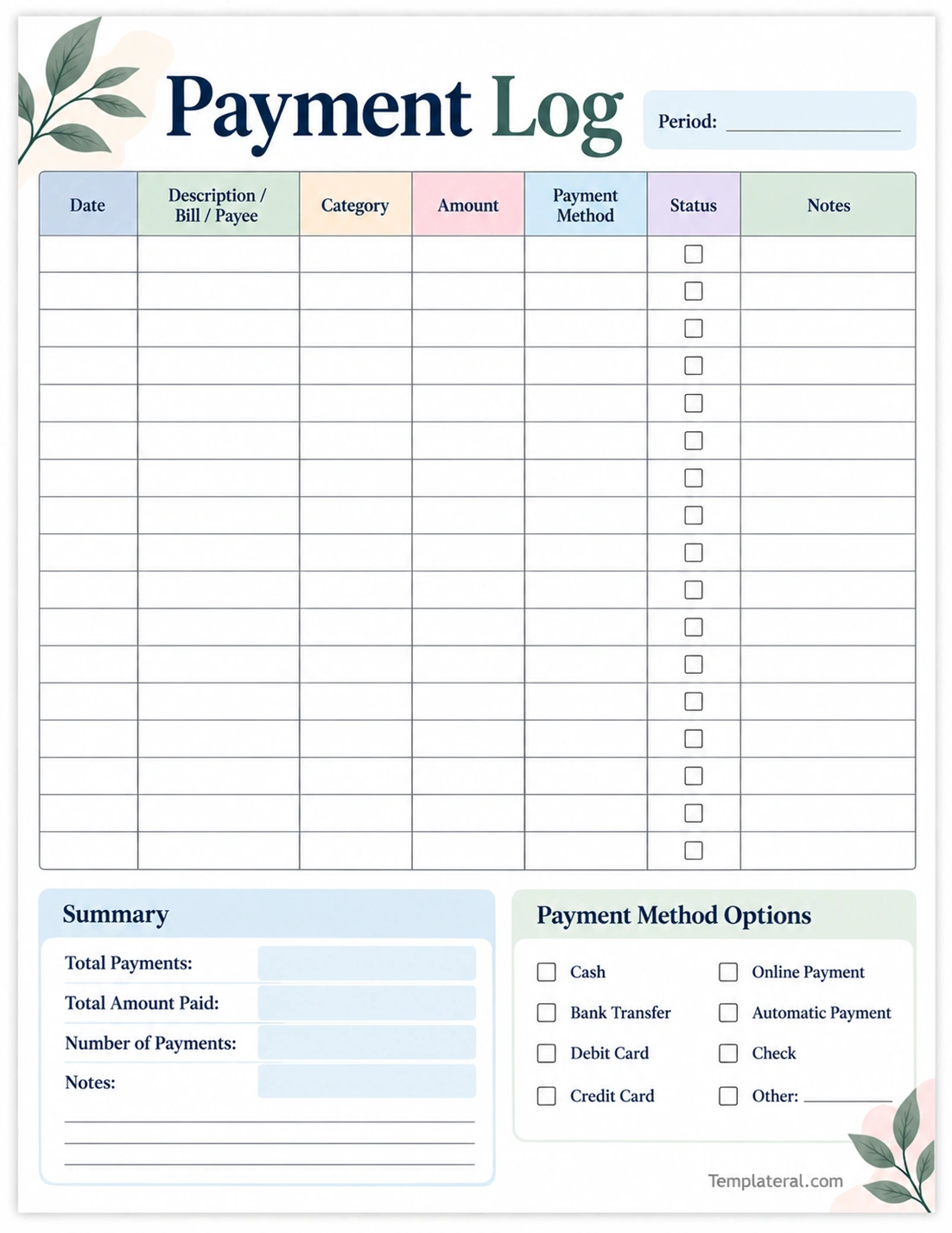
What Is a Payment Log?
A payment log is a written or digital record of payments that have been made. It can contain information such as the payment date, description, amount, category, payment method, and notes.
The format can be as simple as a basic list or as detailed as a transaction ledger. A printable payment log is useful when you want a physical record that can be updated by hand.
A typical payment log may include:
- Date: When the payment was made.
- Description: What the payment was for or who received it.
- Category: The type of expense or payment.
- Amount: How much was paid.
- Payment method: How the payment was completed.
- Status: Whether the transaction has been completed or confirmed.
- Notes: Additional information or reminders.
Why Keep a Payment Log?
Maintaining a payment record can make it easier to organize financial information. Instead of trying to remember individual transactions, you can refer to a written record whenever you need to review your payment history.
Keep Payment Records Organized
A payment log brings transaction information together in one place. This can be especially useful when you make several payments during the week or month.
Recording each payment as it happens creates a chronological record that is easier to review than scattered notes or receipts.
Track Payment Dates
The payment date shows when a transaction was completed. This information can be useful when reviewing recurring expenses, confirming payment timing, or checking your records later.
Record Payment Amounts
Writing down the amount of every payment gives you a clearer record of how much was paid during a specific period. You can use the information to review spending patterns or prepare other financial records.
Remember Payment Methods
Recording the payment method can add useful context to each transaction. For example, you can note whether a payment was made by bank transfer, debit card, check, automatic payment, or another method.
What Information Should a Payment Log Include?
The information you include depends on what you want to track. A simple payment log can contain only the essentials, while a detailed log can include additional information.
Date
Record the date the payment was made. Using a consistent date format makes the log easier to read and organize.
Description or Payee
Write a short description of the transaction or identify the person, company, service, or expense associated with the payment.
Category
A category can help you organize payments by type. Examples include utilities, housing, subscriptions, insurance, services, education, or other household expenses.
Amount
Enter the exact amount paid. Recording the amount at the time of payment helps create a more accurate transaction history.
Payment Method
Note how the payment was made. Common payment methods can include bank transfer, online payment, debit card, automatic payment, check, or other methods.
Status
A status checkbox can be used to confirm that the payment has been completed. If you are using the log to record scheduled transactions, you can update the status after the payment is processed.
Notes
Use the notes area for confirmation numbers, billing changes, reminders, or other information that may be useful later.
How to Use a Payment Log
Creating a payment log is simple. The most important step is to record transactions consistently rather than waiting until you have many payments to enter at once.
1. Choose a Tracking Period
Decide whether you want to maintain the log weekly, monthly, or for another specific period. A monthly payment log can be convenient for routine household expenses.
2. Record Each Payment
Whenever a payment is completed, enter the date, description, amount, and payment method. Add a category if you want to organize payments by expense type.
3. Update the Status
Mark the transaction as completed once the payment has been made or confirmed. This is particularly useful when your log includes scheduled or pending payments.
4. Add Useful Notes
Do not overload the notes field with unnecessary information. Use it for details that you may actually need later, such as confirmation information or a reminder about a recurring payment.
5. Review the Log Regularly
At the end of the tracking period, review your entries. Check the number of payments, total amount paid, and categories that appear most frequently.
Payment Log vs. Bill Tracker
A payment log and a bill tracker are related but serve different purposes.
A bill tracker generally focuses on bills that need to be paid, including upcoming due dates, expected amounts, and payment status.
A payment log generally focuses on payments that have been made or recorded. It creates a transaction history that can be reviewed after the payment occurs.
For example, a bill tracker might show that an electricity bill is due on the 15th, while a payment log can record that the bill was paid on the 12th and document the amount and payment method.
Using both tools can provide a more complete view of scheduled bills and completed payments.
Printable Payment Log Benefits
A printable payment log can be useful for people who prefer handwriting records or want a simple physical worksheet. You can print a fresh copy for each month or tracking period and keep completed pages for reference.
Some practical benefits include:
- Simple recordkeeping: Record payments without complicated software.
- Easy to review: See transactions in chronological order.
- Flexible format: Add notes or categories according to your needs.
- Physical reference: Keep completed records with other household documents.
- Quick updates: Write down payments immediately after completing them.
How to Organize a Payment Log
A well-organized payment log should be easy to scan. Start by entering payments in chronological order so the newest transactions can be identified quickly.
You can also use categories to group similar transactions. For example, household payments might include utilities, housing, insurance, subscriptions, and services.
If you use the log for a longer period, consider starting a new worksheet each month. This keeps each page manageable and makes it easier to review a specific period later.
Tips for Keeping an Accurate Payment Log
Consistency is more important than complexity when maintaining payment records. A few simple habits can make your payment log more useful.
- Record payments promptly: Add transactions soon after they are completed.
- Use consistent categories: Keep category names simple and consistent.
- Double-check amounts: Enter the actual payment amount whenever possible.
- Keep dates accurate: Record the actual payment date rather than relying on memory.
- Use notes selectively: Record details that may help you identify a payment later.
- Review entries regularly: Check your log for missing or unclear information.
- Keep completed records: Store previous logs safely if you need a historical reference.
How a Payment Log Can Support Expense Tracking
A payment log can complement a broader expense tracking system. While the log records individual payments, a budget or expense tracker can provide a wider view of where money is being spent.
For example, reviewing payment categories at the end of the month can show how many transactions were related to utilities, subscriptions, services, or other recurring expenses.
This does not require complicated calculations. Simply having a clear record can make it easier to identify recurring payments and compare transactions across different periods.
Who Can Use a Payment Log?
A payment log can be useful in many everyday situations.
- Families: Record household payments and recurring expenses.
- Individuals: Keep personal payment records organized.
- Couples: Maintain a shared record of household payments.
- Students: Track rent, utilities, subscriptions, and other regular expenses.
- Homeowners: Record household services and recurring payments.
- Renters: Keep a record of rent and other household payments.
Frequently Asked Questions About Payment Logs
What is a payment log?
A payment log is a record used to document payments. It commonly includes the payment date, description, amount, payment method, status, and notes.
What should I write in a payment log?
You can record the date, description or payee, category, amount, payment method, payment status, and any useful notes. The exact fields depend on how detailed you want your payment records to be.
What is the difference between a payment log and a payment tracker?
The terms can be used interchangeably in some situations. Generally, a payment log emphasizes recording transactions, while a payment tracker may emphasize monitoring scheduled or completed payments.
Can I use a printable payment log?
Yes. A printable payment log provides a simple physical worksheet for recording transactions by hand. You can create a new page for each month or tracking period.
How often should I update a payment log?
It is generally easier to keep a payment log accurate when you update it soon after each payment. Regular updates reduce the need to reconstruct transactions from memory later.
Should I record automatic payments?
Yes. Automatic payments can be included in your log so you have a complete record of recurring transactions. Mark them as completed after confirming that the payment was processed.
Can a payment log be used for household bills?
Yes. A payment log can be used to record rent, utilities, insurance, subscriptions, services, and other household payments.
Can a payment log replace a budget?
No. A payment log records individual transactions, while a budget provides a broader plan for income, spending, savings, and financial goals. The two tools can be used together.
Final Thoughts
A payment log provides a simple and organized way to record payments and maintain a useful transaction history. By tracking dates, descriptions, categories, amounts, payment methods, and status, you can keep important payment information in one place.
The best payment tracking system is one that is easy to maintain. Record payments consistently, keep your categories simple, and review your entries regularly. Whether you use a printable payment log or a digital system, maintaining an organized record can make everyday payment management easier.
Download: Payment Log Template
