A weekly work schedule is a practical way to organize your working hours, tasks, meetings, deadlines, and priorities across the entire week. Instead of planning each day separately, a weekly schedule gives you a complete view of your workload and helps you understand how your time is being used.
Whether you work in an office, manage a team, work remotely, run a small business, or have a flexible schedule, a weekly work schedule can make planning easier. It provides a clear structure for assigning tasks to specific days and times while leaving enough room to adjust when priorities change.
A well-designed work schedule does not need to be complicated. A simple printable schedule with Monday through Sunday columns, time slots, task space, and priority sections can be enough to organize a productive week.
What Is a Weekly Work Schedule?
A weekly work schedule is a planning document that shows how work activities are organized throughout a seven-day period. It can include working hours, appointments, meetings, projects, deadlines, administrative tasks, and other professional responsibilities.
Unlike a daily schedule, which focuses on one day, a weekly work schedule lets you see your workload from a broader perspective. This makes it easier to identify busy periods, distribute tasks, and protect time for important work.
A typical weekly work schedule may include:
- Monday through Sunday columns
- Working hours and time slots
- Daily tasks and assignments
- Meetings and appointments
- Weekly goals
- Important priorities
- Notes and reminders
- Task checklists
Why Use a Weekly Work Schedule?
Planning your work week in advance can help you make better use of available time. Instead of deciding what to do only when a task appears, you can create a basic structure before the week begins.
See Your Workload Clearly
A weekly schedule provides an overview of your commitments. You can quickly see which days are full and where you have open time available for focused work.
Organize Priorities
Not every task has the same level of importance. A weekly work planner allows you to identify high-priority activities and make sure they receive attention before less important tasks.
Manage Deadlines
Adding deadlines to your weekly schedule makes important dates easier to remember. You can also work backward from a deadline and divide a larger project into smaller tasks throughout the week.
Reduce Scheduling Conflicts
When meetings, appointments, project work, and other commitments are recorded in one place, it becomes easier to identify overlapping activities before they create problems.
Maintain a Consistent Routine
A weekly schedule can also help establish consistent work habits. Repeating certain activities at predictable times can make your workday more structured and easier to manage.
Weekly Work Schedule Template
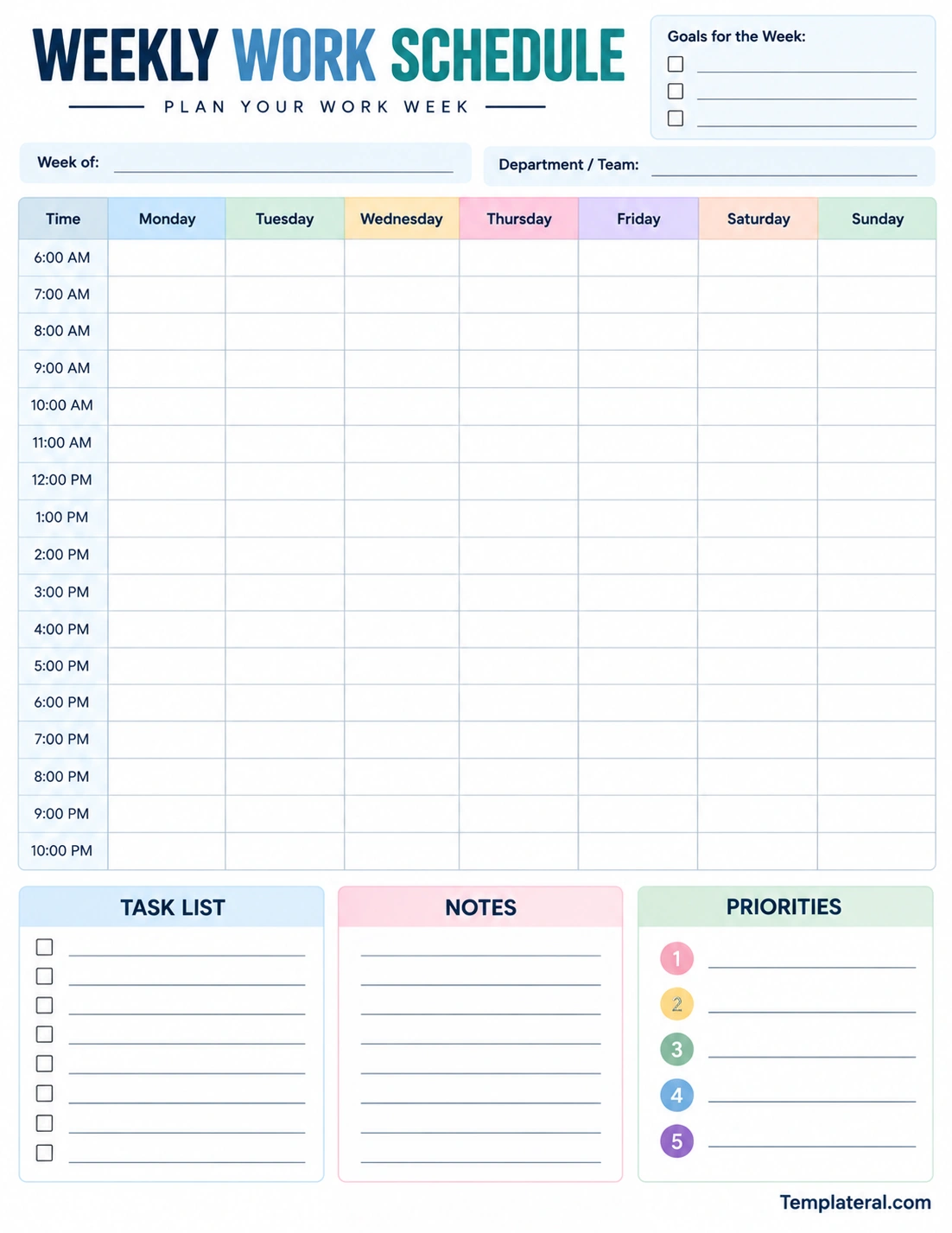
A weekly work schedule template gives you a ready-made structure for organizing your working week. Instead of creating a new table from scratch, you can simply fill in the dates, working hours, tasks, meetings, and priorities.
A printable template is particularly useful when you prefer to keep your schedule visible on your desk or workspace. You can write directly on the page, make changes during the week, and prepare a fresh copy for the following week.
What Should a Weekly Work Schedule Include?
The right schedule depends on your job and working style, but several sections can make a weekly work planner more useful.
Work Hours
Start by identifying your normal working hours. A time-based schedule makes it easier to assign tasks to specific periods of the day and understand how much time is available.
Daily Tasks
List the tasks you expect to complete on each day. Use short and clear descriptions so you can quickly scan the schedule during a busy workday.
Meetings and Appointments
Record meetings, calls, interviews, appointments, and other activities that occur at specific times. Adding these first gives you a better idea of the time remaining for other work.
Weekly Goals
Weekly goals provide a broader direction for the schedule. These might include completing a project milestone, finishing a report, contacting clients, or preparing materials for an upcoming meeting.
Task List
A separate task list is useful for work that needs to be completed but does not have a fixed time. You can check off each item as it is completed.
Priorities
A priority section helps distinguish important work from routine activities. Limiting your list to a few major priorities can make the schedule easier to follow.
Notes
Leave space for reminders, follow-up information, ideas, instructions, or other details that do not fit naturally into a particular time slot.
How to Create a Weekly Work Schedule
Creating a useful work schedule is easier when you build it in a logical order. The following process can be completed at the beginning of the week or before the new workweek starts.
1. Review Upcoming Commitments
Begin by checking your calendar, deadlines, meetings, appointments, and ongoing projects. Identify anything that must happen during the upcoming week.
2. Add Fixed Activities First
Enter activities that already have specific dates or times. These might include meetings, presentations, calls, training sessions, or appointments.
3. List Your Major Tasks
Write down the important tasks that need to be completed. If a project is large, divide it into smaller steps that can be assigned to different days.
4. Assign Tasks to Available Time
Place tasks into realistic time periods. Avoid filling every available hour because unexpected requests, interruptions, and delays are a normal part of many work environments.
5. Identify Your Top Priorities
Choose the most important work for the week. Your priorities should reflect deadlines, project importance, business needs, or other factors that determine what needs attention first.
6. Review the Entire Week
Look at the completed schedule from Monday through Sunday. Check whether one day is overloaded and whether important work has enough time allocated to it.
7. Update the Schedule During the Week
A work schedule should be flexible. When priorities change, update the schedule rather than trying to follow an outdated plan.
Weekly Work Schedule Examples
Different jobs require different approaches to weekly scheduling. A template can be adjusted according to the type of work being performed.
Office Work Schedule
An office employee may use a weekly schedule for meetings, project work, email management, reports, administrative tasks, and deadlines. Time blocks can help separate meetings from focused work.
Remote Work Schedule
Remote workers can use a weekly work planner to organize online meetings, project deadlines, independent work, breaks, and communication tasks. A clear schedule can help create boundaries between work activities and personal time.
Manager’s Work Schedule
Managers may need to coordinate team meetings, employee check-ins, project reviews, planning sessions, and administrative responsibilities. A weekly schedule can provide a quick overview of recurring and one-time commitments.
Freelancer Work Schedule
Freelancers often manage several clients or projects at the same time. A weekly schedule can help divide available working hours between client work, communication, invoicing, marketing, and business administration.
Small Business Work Schedule
Business owners can use a weekly schedule to balance operations, customer service, planning, inventory, marketing, financial administration, and other responsibilities.
Tips for Creating a More Effective Work Schedule
A good weekly work schedule should help you organize your workload without becoming another source of stress. Keep the system simple enough to maintain consistently.
- Plan before the week starts: Set aside a few minutes to prepare the upcoming schedule.
- Prioritize important work: Put critical deadlines and high-value tasks at the top of your list.
- Use realistic time estimates: Give tasks enough time instead of creating an overly ambitious schedule.
- Leave buffer time: Keep some open space for unexpected work and interruptions.
- Group similar activities: Completing related tasks together can reduce unnecessary switching between different types of work.
- Keep tasks specific: Clear action statements are easier to complete than vague descriptions.
- Review progress daily: Make small adjustments when circumstances change.
- Keep the schedule visible: A printed weekly work schedule can be placed somewhere you can easily reference it.
Time Blocking With a Weekly Work Schedule
Time blocking is one useful method for organizing a weekly work schedule. Instead of simply listing tasks, you assign specific periods of time to different types of work.
For example, you might reserve the morning for focused project work, schedule meetings around the middle of the day, and use the afternoon for communication or administrative tasks.
The purpose of time blocking is not to create a rigid schedule that can never change. Instead, it provides a framework for deciding how available working hours should be used.
Weekly Work Schedule for Team Planning
A weekly schedule can also be useful when coordinating multiple people. Team members can use a shared planning system to understand deadlines, meetings, responsibilities, and important milestones.
When several people are involved in a project, clearly identifying tasks and ownership can reduce confusion. A team schedule can show who is responsible for specific activities and when those activities are expected to be completed.
For collaborative work, keep the schedule easy to understand. Use consistent task names and avoid adding unnecessary information that makes the page difficult to scan.
Printable Weekly Work Schedule vs. Digital Calendar
A digital calendar is useful for reminders, recurring events, notifications, and appointments. It is particularly convenient when you need to access your schedule from multiple devices.
A printable weekly work schedule provides a different experience. The entire week can be visible on one page, and you can quickly write notes, rearrange tasks, or mark completed work by hand.
There is no need to choose only one method. Many people can benefit from using a digital calendar for fixed appointments and a printable weekly work schedule for tasks, priorities, notes, and daily planning.
Common Weekly Scheduling Mistakes
One common mistake is trying to schedule too much work into a limited amount of time. A schedule that looks productive on paper may become frustrating when there is no room for interruptions or unexpected requests.
Another mistake is failing to distinguish between urgent and important work. When every task is treated as equally important, it can become difficult to determine what should receive attention first.
It is also easy to create a schedule and never update it. Work environments change throughout the week, so your schedule should be treated as a flexible planning tool rather than an unchangeable set of instructions.
How to Keep Your Weekly Work Schedule Simple
The best schedule is not necessarily the most detailed one. Start with the information that you actually need to manage your work.
If your workday is highly structured, hourly time slots may be useful. If your work is more flexible, larger task sections may provide more value. You can also add dedicated areas for goals, priorities, notes, or project milestones based on your needs.
Use short descriptions, keep priorities focused, and avoid unnecessary formatting. A clean schedule should allow you to understand your entire workweek within a few seconds.
Final Thoughts
A weekly work schedule is a simple but useful tool for organizing work hours, tasks, meetings, priorities, deadlines, and weekly goals. By planning the week in advance, you can create a clearer view of your workload and make better use of available time.
Whether you are an employee, manager, freelancer, remote worker, or business owner, a weekly schedule can be adapted to fit your working style. The most important thing is to keep it realistic, flexible, and easy to maintain.
A printable weekly work schedule template provides a convenient starting point. Once you establish a planning routine, you can use the same structure each week while adjusting the tasks and priorities to match your current workload.
Download: Weekly Work Schedule Template
