A weekly timetable is a simple planning tool that helps you organize activities, appointments, tasks, study sessions, work commitments, and personal routines throughout the week. By putting your schedule on one page, you can see what needs to happen each day and make better use of your available time.
Instead of keeping separate notes for different days, a weekly timetable provides one central overview from Monday through Sunday. This makes it easier to plan ahead, identify busy periods, and leave enough time for important responsibilities.
A timetable does not have to be complicated. A clean printable layout with daily columns, hourly time slots, priorities, tasks, and notes can provide enough structure for students, professionals, families, and anyone who wants a clearer weekly routine.
What Is a Weekly Timetable?
A weekly timetable is a schedule that organizes activities across seven days. It commonly uses days of the week as columns and time periods as rows, allowing you to assign specific activities to particular times.
Unlike a simple weekly to-do list, a timetable focuses on when something should happen as well as what needs to be done. This makes it particularly useful for people who have appointments, classes, work shifts, study periods, or recurring activities.
A typical weekly timetable may include:
- Monday through Sunday columns
- Hourly or half-hourly time slots
- Appointments and meetings
- Work or study sessions
- Weekly goals
- Priority tasks
- To-do lists
- Notes and reminders
- Habit or routine tracking
Why Use a Weekly Timetable?
Planning your week with a timetable can make your schedule easier to understand. Instead of thinking about individual tasks separately, you can see how everything fits together.
Get a Clear View of Your Week
The biggest benefit of a weekly timetable is the ability to see your entire week at a glance. You can quickly identify which days are busy and where you have available time.
Organize Your Time
Time-based planning encourages you to think about how much time is actually available. This can help prevent the common mistake of assigning more tasks than you can realistically complete.
Keep Important Activities Visible
Appointments, deadlines, classes, meetings, and other fixed commitments can be placed directly into the timetable. Having these activities visible makes them easier to remember.
Create Consistent Routines
Recurring activities can be scheduled at similar times each week. This can be useful for study routines, exercise, household responsibilities, work tasks, meal preparation, and other regular activities.
Reduce Scheduling Conflicts
When activities are recorded in one weekly view, it becomes easier to identify overlapping commitments. You can make adjustments before a scheduling conflict becomes a problem.
Weekly Timetable Template
A weekly timetable template provides a ready-made structure for planning your week. Instead of drawing a new timetable every time, you can simply fill in the dates, activities, priorities, and notes.
A printable timetable is useful if you prefer writing by hand or want your weekly schedule visible in your workspace. You can keep it on a desk, inside a planner, or in another convenient location where it is easy to review.
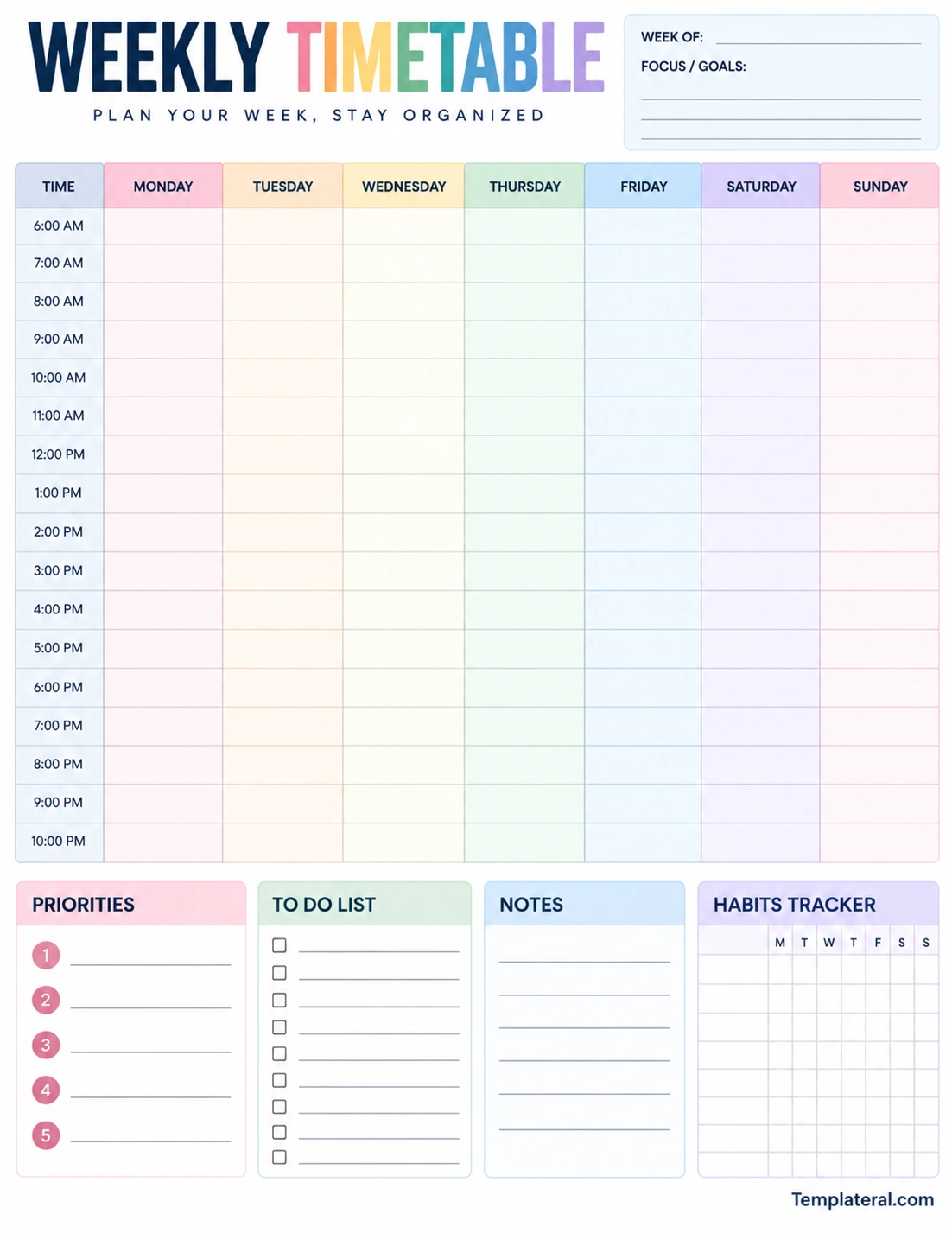
What Should a Weekly Timetable Include?
The ideal timetable depends on how you use it, but several sections can make a weekly schedule more practical.
Days of the Week
A basic weekly timetable should provide space for all seven days. This creates a complete overview and allows activities to be distributed across the entire week.
Time Slots
Time slots help you decide exactly when an activity should happen. An hourly timetable is useful for structured schedules, while larger blocks may be better for flexible routines.
Weekly Goals
Adding a small goals section can help connect daily activities with broader objectives. Your goals might relate to work, school, personal projects, health routines, or household responsibilities.
Priorities
A priority section allows you to identify the most important things you want to accomplish during the week. Keeping the list short can make it easier to stay focused.
To-Do List
Not every task needs a specific time. A separate to-do list provides room for flexible tasks that can be completed whenever there is suitable time available.
Notes
A notes section can be used for reminders, ideas, instructions, shopping items, follow-up tasks, or information that does not fit naturally into the timetable.
Habit Tracker
A habit tracker can be useful for recording recurring activities throughout the week. For example, you might track reading, exercise, study, hydration, or another routine you want to maintain.
How to Create a Weekly Timetable
Creating a useful timetable is easier when you start with fixed commitments and then build flexible activities around them.
1. List Your Fixed Commitments
Start by writing down appointments, classes, meetings, work shifts, events, and other activities that occur at specific times.
2. Add Important Deadlines
Record deadlines and due dates before adding less important tasks. This gives you a clear understanding of what must be completed during the week.
3. Identify Your Priorities
Choose the tasks or goals that deserve the most attention. Avoid creating an excessively long priority list because it can make the timetable difficult to follow.
4. Add Flexible Tasks
Once fixed activities are in place, add flexible tasks to the available spaces. Assign realistic time periods based on the amount of work required.
5. Leave Buffer Time
Do not fill every available time slot. Leaving some open space gives you flexibility when unexpected tasks, delays, or changes occur.
6. Review the Complete Week
Look at your timetable from Monday through Sunday. Check whether some days are overloaded and whether important tasks have enough time allocated to them.
7. Update It as Needed
Your weekly timetable should be flexible. If an appointment changes or a task takes longer than expected, adjust the schedule instead of trying to follow an outdated plan.
Weekly Timetable for Students
Students can use a weekly timetable to organize classes, homework, study sessions, assignments, exams, extracurricular activities, and personal commitments.
A time-based student timetable can make it easier to create regular study periods. For example, a student might reserve certain afternoons for homework and specific evenings for exam preparation.
Large assignments can also be divided into smaller steps. Instead of scheduling “finish project” as one large task, the timetable might include research, outlining, drafting, editing, and final review on different days.
Weekly Timetable for Work
Professionals can use a weekly timetable to organize meetings, project work, calls, administrative tasks, deadlines, and focused work periods.
Time blocking can be particularly useful for work schedules. You can reserve specific periods for concentrated project work and keep other periods available for meetings or communication.
A weekly work timetable can also help identify days when the schedule is too crowded. If several meetings are already planned for one day, flexible tasks can potentially be moved to another available period.
Weekly Timetable for Personal Planning
A weekly timetable is not limited to school or work. It can also organize personal responsibilities and everyday routines.
You might use one to plan exercise, household chores, grocery shopping, appointments, meal preparation, hobbies, family activities, or personal projects.
Combining personal and professional activities can provide a more realistic picture of how your available time is being used. However, it is still important to protect some open time rather than scheduling every hour.
How to Use Time Blocking With a Weekly Timetable
Time blocking means assigning specific periods to particular activities. Instead of keeping a long list of tasks, you decide when those tasks will receive your attention.
For example, a weekly timetable could include focused work in the morning, meetings around midday, administrative tasks in the afternoon, and personal activities later in the day.
Time blocking should remain flexible. If an activity takes longer than expected, adjust the timetable rather than treating the original schedule as fixed.
Tips for Using a Weekly Timetable Effectively
A timetable works best when it is simple enough to use consistently. The following tips can help you create a practical weekly planning routine.
- Plan ahead: Prepare your timetable before the new week begins.
- Start with fixed events: Add appointments, classes, meetings, and deadlines first.
- Keep priorities focused: Choose a manageable number of important goals.
- Estimate tasks realistically: Give activities enough time instead of creating an overly ambitious schedule.
- Leave empty space: Keep some time available for unexpected responsibilities.
- Use short descriptions: Concise task names make the timetable easier to read.
- Review daily: Spend a few minutes checking and updating the schedule.
- Keep it visible: Place a printable timetable somewhere you naturally look during the day.
Printable Weekly Timetable vs. Digital Calendar
A digital calendar can be useful for notifications, recurring events, reminders, and appointments. It is particularly convenient when you need access to your schedule from multiple devices.
A printable weekly timetable offers a different planning experience. The complete week can remain visible on one page, and you can write directly on the schedule, cross out completed tasks, or make quick changes by hand.
You can also combine both approaches. For example, a digital calendar can store appointments and reminders, while a printable weekly timetable can be used for daily tasks, priorities, study sessions, or personal planning.
Common Weekly Timetable Mistakes
One common mistake is trying to schedule every minute of the week. Although a detailed timetable may look organized, it leaves little room for interruptions or unexpected responsibilities.
Another mistake is confusing a task list with a timetable. A list tells you what needs to be done, while a timetable also considers when the activity will happen. Combining both can create a more useful planning system.
It is also easy to create a timetable that contains too much information. Keep descriptions short and use dedicated sections for notes or additional details when necessary.
How to Keep Your Weekly Timetable Simple
A good timetable should make planning easier, not create more work. Start with the information that is most important to your routine.
If you have a highly structured day, an hourly timetable may be appropriate. If your schedule is flexible, broader time blocks can provide more freedom.
You can also customize the template according to your needs. Add sections for priorities, goals, tasks, notes, or habits only when they provide genuine value.
Final Thoughts
A weekly timetable is a practical way to organize time, activities, appointments, tasks, and routines across an entire week. By combining daily time slots with priorities, goals, and flexible task lists, you can create a clearer picture of how your week is organized.
Whether you are a student, professional, parent, freelancer, or simply looking for a better way to manage personal responsibilities, a weekly timetable can be adapted to your needs.
The key is to keep your schedule realistic and flexible. Start with fixed commitments, add your most important priorities, assign tasks to available time, and leave enough space for unexpected changes. A simple printable weekly timetable can then become a practical planning tool that you can reuse every week.
Download: Template for Weekly Timetable
