Gantt sheets are practical planning tools that help organize tasks, schedules, deadlines, and project progress in one visual timeline. By showing tasks alongside dates or time periods, a Gantt sheet makes it easier to understand what needs to be completed, when each task should begin, and how different activities fit together.
Gantt sheets can be useful for project managers, students, business owners, teachers, event planners, freelancers, and anyone who needs to coordinate multiple activities over a specific period. A printable Gantt sheet can be especially convenient when you prefer to plan on paper, keep a physical project folder, or review a schedule without opening a digital application.
Whether you are planning a small project or managing a more detailed schedule, a well-organized Gantt sheet can turn a long list of tasks into a clear visual plan.
What Are Gantt Sheets?
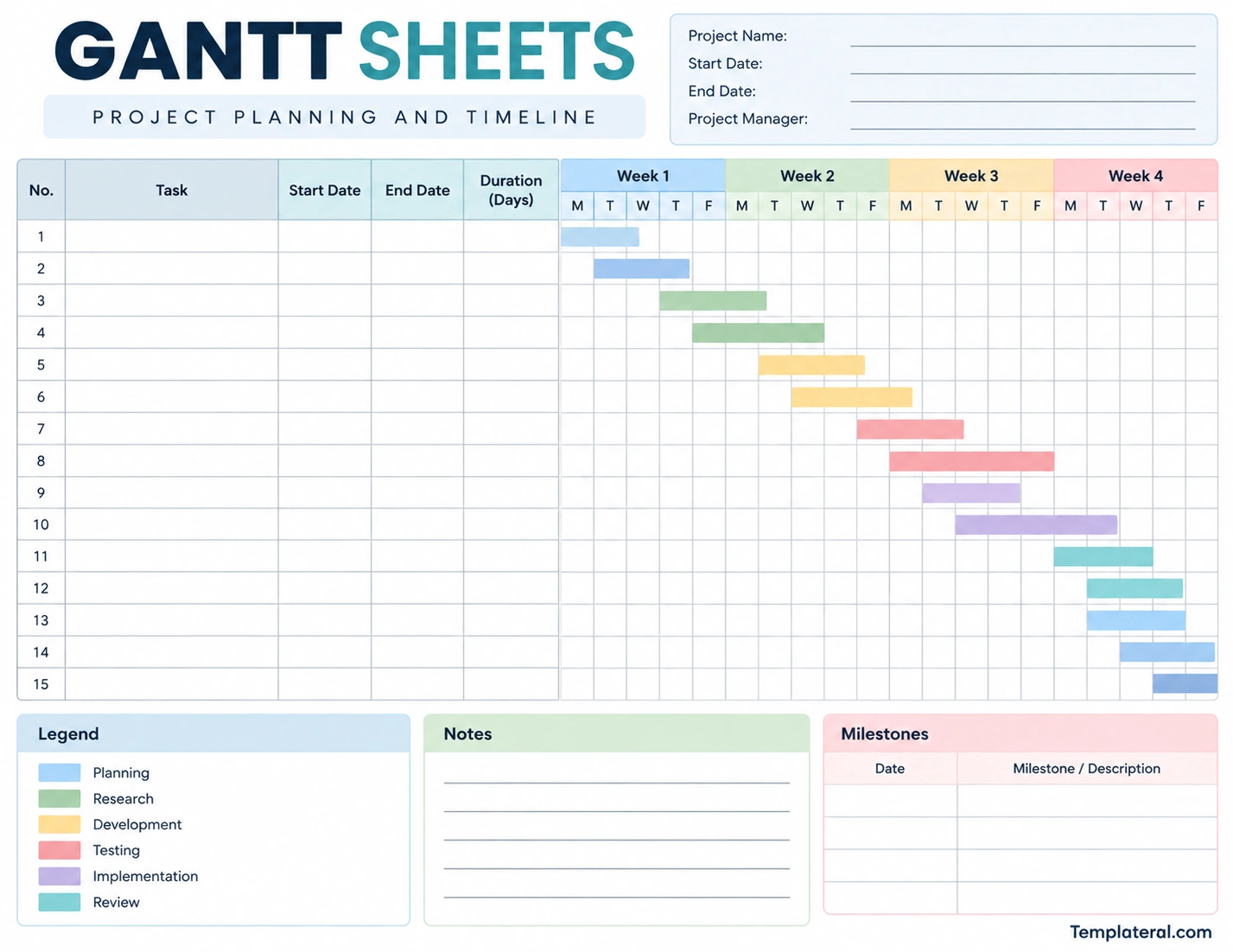
Gantt sheets are planning worksheets based on the Gantt chart concept. They typically combine a task list with a horizontal timeline. Each task is assigned a position on the timeline so that its expected start date, duration, and end date can be viewed at a glance.
A typical Gantt sheet may include columns for task names, start dates, end dates, duration, assigned person, status, and notes. The timeline section then provides a visual representation of when each task should take place.
Unlike a simple to-do list, a Gantt sheet emphasizes time and sequence. This makes it particularly useful when tasks have deadlines, dependencies, or overlapping schedules.
Why Use a Gantt Sheet?
A project can become difficult to manage when there are many tasks happening at different times. A Gantt sheet provides a structured overview that can make the schedule easier to understand.
Visualize the Project Timeline
The most obvious advantage is the visual timeline. Instead of reading dates from a list, you can see how long each task is expected to take and where it falls within the overall project.
Organize Multiple Tasks
A Gantt sheet allows you to put several tasks into one planning document. This can make it easier to identify busy periods, upcoming deadlines, and gaps in the schedule.
Track Project Progress
You can update a Gantt sheet as work progresses. Tasks can be marked as completed, in progress, delayed, or not yet started, depending on the format you use.
Understand Task Relationships
Some tasks cannot begin until another task has been completed. A timeline makes these relationships easier to identify and can help prevent scheduling conflicts.
Keep Planning Simple
For smaller projects, a printable Gantt sheet can provide many of the benefits of project scheduling software without requiring a complicated setup.
What Should a Gantt Sheet Include?
The exact layout can vary depending on the type of project, but most useful Gantt sheets contain several core elements.
Task List
The task list identifies the activities that need to be completed. Use short, descriptive task names so the schedule remains easy to scan.
Start and End Dates
Start and end dates define when each task is expected to begin and finish. These dates provide the foundation for placing tasks on the timeline.
Duration
Duration indicates how long a task is expected to take. Depending on the project, duration may be measured in hours, days, weeks, or months.
Timeline
The timeline is the visual portion of the Gantt sheet. It may be organized by days, weeks, months, or other time periods depending on the project’s length.
Milestones
Milestones identify important points in a project, such as the completion of a major phase, approval, launch, submission, or delivery.
Notes
A notes section provides space for additional instructions, reminders, dependencies, or information that does not fit neatly into the task table.
How to Create a Gantt Sheet
Creating a Gantt sheet does not have to be complicated. A basic version can be created using a spreadsheet, printed worksheet, or project planning template.
1. Define the Project
Start by identifying the project you want to plan. Give it a clear name and determine the overall start and target completion dates.
2. List the Tasks
Write down all major activities required to complete the project. Break large activities into smaller tasks when doing so makes the schedule easier to manage.
3. Set Start and End Dates
Assign an expected start and end date to each task. Be realistic about how much time each activity requires.
4. Add the Tasks to the Timeline
Place each task on the appropriate section of the timeline. A horizontal bar can represent the period during which a task is scheduled to occur.
5. Add Milestones
Identify important deadlines or project checkpoints. Milestones can help you see whether the project is moving toward its major objectives.
6. Review Task Dependencies
Check whether any task depends on another task being completed first. Adjust the schedule if necessary to create a realistic sequence.
7. Update the Sheet
A Gantt sheet becomes more useful when it reflects the current state of the project. Update task status and dates when circumstances change.
Gantt Sheets for Different Types of Projects
Gantt sheets are flexible enough to be used for many different planning situations.
Business Projects
Businesses can use Gantt sheets to plan product launches, marketing campaigns, website projects, operational improvements, and other initiatives.
Construction Projects
Construction schedules often involve multiple activities that must happen in a particular sequence. A Gantt-style timeline can help visualize phases such as planning, preparation, installation, inspection, and completion.
School Projects
Students can use a Gantt sheet to break a large assignment into research, drafting, editing, review, and submission stages. This can make long-term projects easier to manage.
Event Planning
Event planners can use Gantt sheets to organize venue preparation, invitations, vendor coordination, marketing, equipment arrangements, setup, and event-day activities.
Website Projects
A website project can be divided into planning, content creation, design, development, testing, revisions, and launch. A Gantt timeline makes it easier to visualize how these stages overlap.
Printable Gantt Sheets vs. Digital Gantt Charts
Both printable and digital formats can be useful. The best choice depends on the size of the project and your preferred planning method.
Printable Gantt Sheets
A printable Gantt sheet is useful when you want a physical planning document. You can write tasks by hand, mark progress, add notes, and keep the worksheet with other project documents.
Printable sheets are also convenient for meetings where participants want to review a project schedule together without relying on a shared digital application.
Digital Gantt Charts
Digital Gantt charts are useful for larger or frequently changing projects. They can make it easier to move dates, update task relationships, assign team members, and maintain multiple versions of a project plan.
For a small project, however, a simple printable Gantt sheet may provide all the planning structure you need.
Tips for Using Gantt Sheets Effectively
A Gantt sheet works best when the information remains clear and manageable. The following practices can make your project schedule easier to use.
- Keep task names concise: Use clear descriptions rather than long paragraphs.
- Break down large tasks: Smaller tasks are easier to schedule and track.
- Use realistic dates: Avoid creating a timeline that leaves no room for normal delays.
- Mark important milestones: Highlight major deadlines and project checkpoints.
- Review the schedule regularly: Update dates and task status as the project develops.
- Allow flexibility: Projects rarely follow the original schedule perfectly.
- Keep the layout readable: A crowded Gantt sheet can become difficult to use.
Common Gantt Sheet Mistakes
Although a Gantt sheet is simple to use, poor planning can make the schedule less useful.
Adding Too Much Detail
Including every tiny activity can make the timeline difficult to read. Focus on tasks that are meaningful to the project’s schedule and progress.
Using Unrealistic Deadlines
A schedule should reflect the actual time required to complete the work. Setting overly aggressive deadlines can make the entire Gantt plan unreliable.
Ignoring Dependencies
Some tasks cannot begin until earlier work has been completed. Make sure the timeline reflects these relationships.
Never Updating the Schedule
A Gantt sheet is a planning tool, not a document that must remain unchanged. If a deadline moves or a task takes longer than expected, update the schedule.
Creating an Overly Complicated Layout
The purpose of a Gantt sheet is to make the schedule easier to understand. Too many colors, columns, labels, or categories can have the opposite effect.
How to Organize a Weekly Gantt Sheet
A weekly Gantt sheet can be particularly useful for short projects or projects that need frequent review. Instead of displaying months of information, the timeline can show individual weekdays across one or several weeks.
For example, a four-week project might include columns for Monday through Friday across four consecutive weeks. Each task can then be represented by a horizontal bar covering the days when the work is scheduled.
This format makes it easy to see which tasks are happening simultaneously and which activities are scheduled for later in the project.
Gantt Sheets for Project Tracking
Gantt sheets can be used for more than initial planning. They can also become project tracking documents.
One simple approach is to distinguish between planned and completed work. As tasks are finished, mark them as complete or update their status. If a task is delayed, adjust its timeline and review the effect on dependent tasks.
For more detailed project management, you can add columns for task owners, priority, percentage complete, status, and notes. However, keep the worksheet focused on the information that your project actually requires.
How to Choose a Gantt Sheets Template
A good Gantt sheets template should make project information easy to enter and easy to understand. Before choosing a template, consider the length and complexity of your project.
- For short projects: Use a weekly or monthly layout with a simple task list.
- For larger projects: Use a template with milestones, dependencies, and additional tracking fields.
- For paper planning: Choose a printable layout with sufficient writing space.
- For team projects: Include fields for task owners and status.
- For recurring planning: Choose a reusable template that can be copied for each new project.
Final Thoughts on Gantt Sheets
Gantt sheets provide a simple visual way to organize tasks, dates, deadlines, milestones, and project progress. By combining a task list with a timeline, they make it easier to understand how individual activities fit into the larger project.
Whether you are managing a business project, school assignment, event, construction schedule, or website launch, a Gantt sheet can help turn a collection of tasks into a structured plan.
For small projects, a printable Gantt sheet may be all you need. Keep the layout clear, use realistic dates, identify important milestones, and update the schedule as work progresses. With these simple practices, a Gantt sheet can become a practical tool for both project planning and day-to-day tracking.
Download: Gantt Sheets Template
