Software project planning is the process of defining the goals, scope, tasks, resources, timeline, risks, and responsibilities needed to complete a software project successfully. A well-prepared plan gives the development team a clear direction and helps project stakeholders understand what needs to be delivered, when it should happen, and who is responsible for each activity.
Whether you are developing a mobile application, business platform, website, SaaS product, or internal software system, effective planning can reduce confusion and improve coordination. A software project plan also provides a useful reference when priorities change, unexpected risks appear, or the project needs to be adjusted during development.
What Is Software Project Planning?
Software project planning is the structured process of deciding how a software project will be organized and executed. It translates a project idea into a practical roadmap that the team can follow throughout the development lifecycle.
A software project plan typically defines the project’s objectives, scope, deliverables, team members, resources, schedule, milestones, risks, communication requirements, and success criteria.
The planning process can be used with different software development approaches, including Agile, Scrum, Waterfall, and hybrid methodologies. The level of detail may change depending on the methodology, project size, team structure, and organizational requirements.
Why Is Software Project Planning Important?
Software development involves many connected activities. Requirements must be understood before development begins, design decisions can affect implementation, testing depends on completed features, and deployment may require technical preparation.
Without a clear plan, teams may have difficulty understanding priorities or estimating how individual tasks affect the overall schedule.
Effective project planning can help teams:
- Define clear project objectives.
- Establish a realistic project scope.
- Identify major deliverables and milestones.
- Assign responsibilities to team members.
- Estimate resources and development time.
- Identify potential project risks.
- Coordinate dependencies between tasks.
- Track project progress.
- Communicate expectations with stakeholders.
- Create a structured path from requirements to deployment.
A project plan does not guarantee that every task will happen exactly as expected. Instead, it provides a baseline that makes changes easier to understand and manage.
Key Components of a Software Project Plan
A useful software project plan should contain enough information to guide the project without becoming unnecessarily complicated. The exact sections can vary, but several components are commonly useful.
Project Overview
The project overview provides a high-level description of the software initiative. It can explain what the team is building, why the project is needed, and what outcome the organization expects.
This section may include the project name, project manager, development team, start date, target completion date, project description, and high-level objectives.
Goals and Objectives
Clear goals help the team understand what success looks like. Objectives should be specific enough that progress can be evaluated throughout the project.
For example, instead of writing “build a better application,” a project objective could describe a specific capability, user outcome, performance requirement, or business result that the software is expected to deliver.
Project Scope
The scope defines what is included in the project and what is outside its boundaries. This distinction is particularly important in software development because new feature requests can easily expand the amount of work.
A project plan can separate in-scope and out-of-scope items. This gives stakeholders a clearer understanding of what the current project is expected to deliver.
Stakeholders and Responsibilities
Stakeholders can include product owners, clients, managers, developers, designers, testers, technical specialists, and other people affected by the project.
Recording each person’s role and responsibility can reduce uncertainty. It also makes it easier to determine who should make decisions, provide approvals, or complete specific tasks.
Resources
Resources may include team members, software tools, development environments, cloud infrastructure, testing systems, hardware, documentation, and budget allocations.
Identifying resources early helps the project team determine whether the necessary capabilities are available before major development work begins.
Project Timeline
The timeline shows when major activities are expected to begin and end. It can include requirements analysis, system design, development, testing, user acceptance testing, deployment, project review, and closure.
A Gantt chart is one useful way to visualize these activities because it shows task duration and timing on a shared timeline.
Risk Assessment
Software projects can encounter technical, organizational, scheduling, security, resource, and dependency-related risks. A risk assessment identifies potential problems before they become major obstacles.
A basic risk register can record the risk, potential impact, likelihood, and mitigation plan.
Milestones
Milestones represent important points in the project. Examples include requirements completion, design approval, development completion, testing completion, deployment, and project closure.
Milestones provide useful checkpoints for reviewing progress without requiring the team to evaluate every small task at the same level.
Success Criteria
Success criteria define how the team will determine whether the project has achieved its intended goals. Depending on the project, criteria might involve functionality, performance, usability, quality, security, adoption, or business requirements.
Software Project Planning Template
A software project planning template provides a structured starting point for organizing the most important information about a software development project. Instead of creating a planning document from scratch, project managers and teams can use predefined sections and customize them for their specific needs.
The printable template below combines project information, objectives, stakeholders, resources, a project timeline, risk assessment, milestones, notes, and approval fields in one organized worksheet.
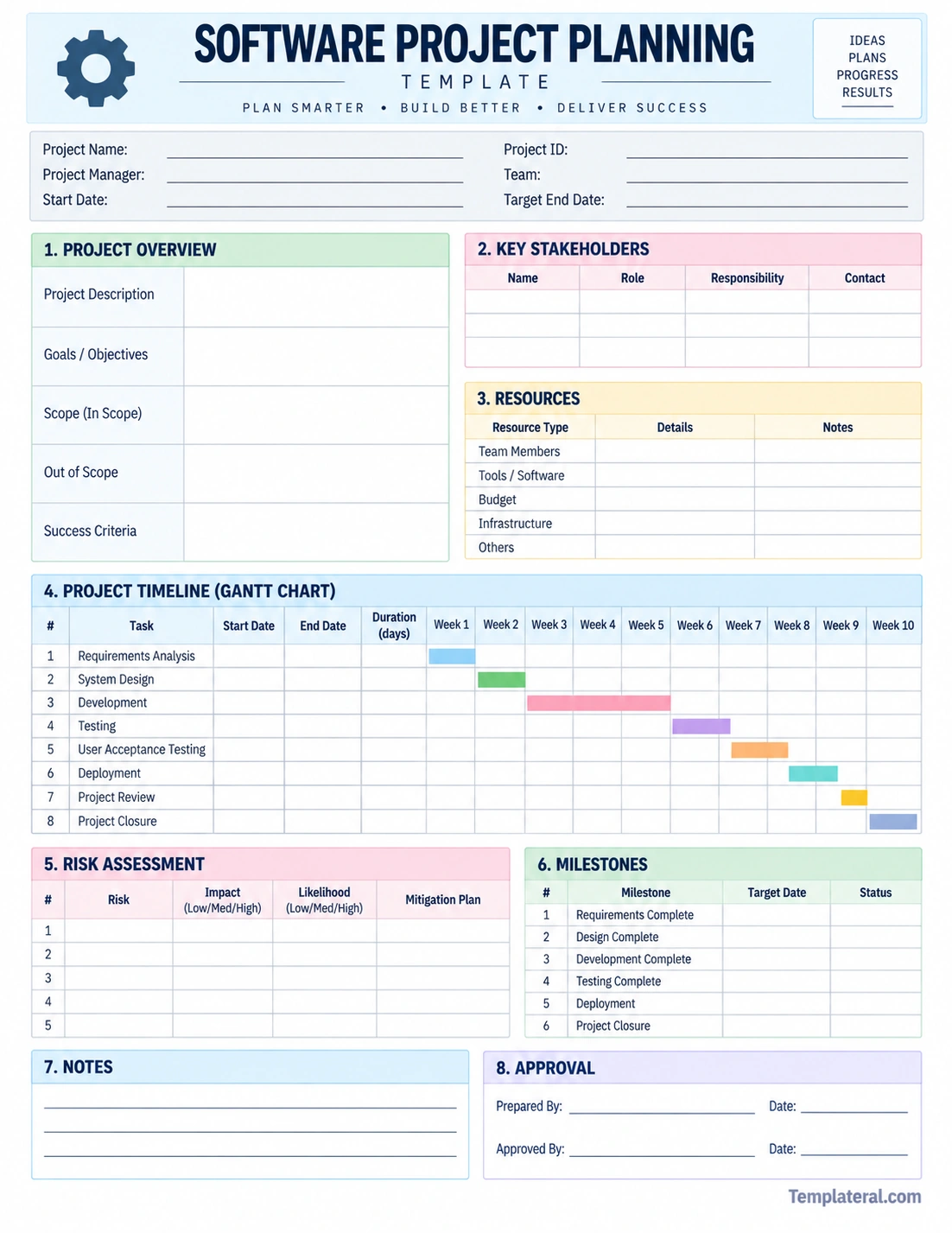
The template can be used during project kickoff, planning meetings, requirements discussions, sprint planning, or periodic project reviews. Teams can print it for handwritten planning or use its structure as a reference when creating a digital project management document.
How to Create a Software Project Plan
Creating a software project plan does not need to be complicated. The process can be broken into practical steps that gradually turn a project concept into an actionable roadmap.
1. Define the Project Goal
Start by explaining what the software project is intended to accomplish. Identify the problem being addressed and the expected outcome.
A clear goal gives the team a common point of reference when making decisions about features, resources, and priorities.
2. Define the Scope
List the major features, capabilities, and deliverables that are included in the project. Then identify items that are intentionally excluded.
Defining scope early can help prevent uncontrolled expansion of the project. If new requirements appear later, the team can evaluate their effect on scope, schedule, resources, and priorities.
3. Break the Work Into Tasks
Divide major deliverables into smaller tasks. For example, developing a user authentication system could involve requirements, interface design, database work, implementation, testing, security review, and deployment preparation.
Smaller tasks are generally easier to assign, estimate, track, and review.
4. Assign Responsibilities
Identify who is responsible for each major activity. Depending on the project, responsibilities may be divided among product management, UX design, frontend development, backend development, quality assurance, DevOps, security, and other functions.
5. Build the Timeline
Estimate when each task should start and finish. Consider task dependencies when creating the schedule.
For example, certain development tasks may depend on completed requirements or approved designs. Testing may depend on the availability of a working build. Deployment may depend on successful testing and infrastructure preparation.
6. Establish Milestones
Choose several meaningful checkpoints throughout the project. Milestones should represent significant achievements rather than every individual task.
Examples include requirements approved, prototype completed, development completed, testing completed, and production deployment.
7. Identify Risks
Think about what could prevent the project from reaching its objectives. Consider technical uncertainty, staffing changes, dependency delays, changing requirements, integration issues, security concerns, and testing constraints.
For each important risk, consider a practical mitigation strategy.
8. Define Success Criteria
Decide how project completion will be evaluated. Clear success criteria help prevent disagreement about whether the software is ready for delivery.
Software Project Planning for Agile Teams
Agile development does not eliminate project planning. Instead, planning is typically distributed across different levels and updated as the project evolves.
An Agile software project may include a product vision, product backlog, release goals, sprint objectives, user stories, acceptance criteria, and short-term delivery plans.
Rather than creating one fixed schedule for every detail, the team can maintain a high-level roadmap while planning individual iterations in greater detail.
Planning in Scrum
Scrum teams commonly work with a prioritized product backlog and plan the work selected for each sprint. Sprint planning focuses on the objective and work for the upcoming iteration.
A broader software project planning document can still be useful for recording project goals, stakeholders, major milestones, dependencies, risks, and target releases.
Software Project Planning for Waterfall Projects
Waterfall projects generally place greater emphasis on upfront planning and sequential phases. Requirements, design, development, testing, and deployment may be planned in more detail before implementation begins.
A detailed timeline and dependency map can therefore be especially useful for projects that require formal approvals or have relatively stable requirements.
Even in a structured methodology, however, project plans should be reviewed when significant assumptions or requirements change.
Common Software Project Planning Challenges
Planning a software project can be difficult because software development involves uncertainty. Several common challenges can affect the quality of a project plan.
Unclear Requirements
If requirements are incomplete or constantly changing, estimates and schedules can become unreliable. Teams should clarify important requirements before committing to detailed delivery plans.
Unrealistic Estimates
Development tasks may take longer than expected because of technical complexity, integration problems, debugging, or unexpected dependencies. Estimates should account for reasonable uncertainty rather than assuming that everything will proceed perfectly.
Scope Creep
Scope creep occurs when additional requirements gradually expand the project without a corresponding adjustment to resources, schedule, or priorities.
A documented scope makes it easier to evaluate proposed changes before they are added to the project.
Poor Communication
A technically strong project can still experience problems when stakeholders have different expectations. Regular communication helps keep the team aligned on priorities, decisions, risks, and changes.
Ignoring Dependencies
Some tasks cannot begin until another task is completed. Failing to identify dependencies can create delays that affect multiple parts of the schedule.
Tips for Better Software Project Planning
A good project plan should be practical enough that the team actually uses it. Consider these tips when preparing your next software development plan:
- Keep the main objectives visible: Make sure the team can quickly see what the project is trying to achieve.
- Separate must-have and optional features: This makes prioritization easier when time or resources become limited.
- Document assumptions: Record important assumptions behind estimates and schedules.
- Track dependencies: Identify tasks that rely on other activities or external teams.
- Review risks regularly: Risks can change as development progresses.
- Use measurable milestones: Make milestones specific enough to confirm whether they have been achieved.
- Update the plan: A project plan should evolve when important information changes.
- Communicate changes: Make sure relevant stakeholders understand significant changes to scope, timing, or responsibilities.
- Avoid unnecessary detail: Include information that helps the team make decisions and execute the project.
Software Project Planning Checklist
Before starting development, review the following areas to make sure the project plan is sufficiently prepared:
- Project goal is clearly defined.
- Project scope is documented.
- Major deliverables are identified.
- Stakeholders and responsibilities are documented.
- Required resources are identified.
- Major tasks are listed.
- Dependencies have been considered.
- Project timeline has been estimated.
- Major milestones are defined.
- Potential risks have been identified.
- Mitigation strategies are documented for important risks.
- Success criteria are established.
- Communication expectations are clear.
- Project approval requirements are understood.
Frequently Asked Questions About Software Project Planning
What is included in software project planning?
Software project planning commonly includes project objectives, scope, deliverables, tasks, responsibilities, resources, timeline, dependencies, milestones, risks, communication requirements, and success criteria.
What is a software project planning template?
A software project planning template is a pre-structured document that helps organize information needed to plan a software development project. It may include sections for project details, goals, stakeholders, resources, timeline, risks, milestones, and approvals.
Why is a project timeline important in software development?
A project timeline provides a visual representation of when major tasks and milestones are expected to occur. It can help teams coordinate dependencies and communicate delivery expectations.
Can a software project planning template be used for Agile projects?
Yes. An Agile team can adapt a project planning template to document high-level goals, stakeholders, resources, major milestones, risks, releases, and other information. Detailed iteration planning can then be handled through the team’s normal Agile workflow.
How often should a software project plan be updated?
The plan should be reviewed whenever significant changes affect project scope, schedule, resources, risks, or objectives. The appropriate review frequency depends on the project’s size, methodology, and rate of change.
Conclusion
Software project planning provides a structured foundation for turning a software idea into an organized development effort. By defining objectives, scope, responsibilities, resources, timelines, milestones, risks, and success criteria, teams can create a shared understanding of what needs to happen and how progress will be measured.
A software project planning template can make this process easier by providing ready-to-use sections for the most important planning information. Whether you are managing an Agile product, a Waterfall implementation, a mobile application, a web platform, or an internal business system, the template can be adapted to match the project’s needs.
The most useful project plan is not necessarily the longest one. It is the plan that gives the team enough clarity to make decisions, coordinate work, manage risks, and respond to changes throughout the software development lifecycle.
Download: Software Project Planning Template
