An action item is a specific task or follow-up activity that needs to be completed after a meeting, discussion, project review, or planning session. Unlike general meeting notes, an action item identifies something that needs to happen, usually along with a responsible person and a deadline.
Meetings often generate useful ideas and decisions, but those decisions only create results when someone takes action. Without a clear record of what needs to be done, who is responsible, and when the task should be completed, important follow-up work can easily be forgotten.
An action item tracker provides a simple way to organize these responsibilities. By recording tasks in one place, teams can monitor progress, identify overdue work, and make sure important follow-up activities do not disappear after the meeting ends.
What Is an Action Item?
An action item is a task or activity that results from a meeting, conversation, decision, or project discussion. It represents something that requires follow-up rather than simply being information shared during the meeting.
A useful action item should be specific enough that the person responsible understands what needs to be completed. It should ideally include an owner, deadline, priority, and status.
For example, instead of writing:
“Website improvements”
A clearer action item would be:
“Review the homepage content and provide recommended changes by Friday.”
The second version identifies a specific activity and a deadline, making it easier to assign and track.
Why Are Action Items Important?
Action items turn meeting discussions into measurable follow-up tasks. Without them, teams may leave a meeting with a general understanding of what was discussed but no clear accountability for what happens next.
Well-defined action items can help teams:
- Turn decisions into specific tasks.
- Assign responsibility to the appropriate person.
- Establish clear deadlines.
- Prioritize important work.
- Monitor task progress.
- Reduce the chance of missed follow-ups.
- Improve accountability.
- Make future meetings more productive.
An action item list is especially useful for recurring meetings where tasks may continue from one meeting to the next.
What Is an Action Item Tracker?
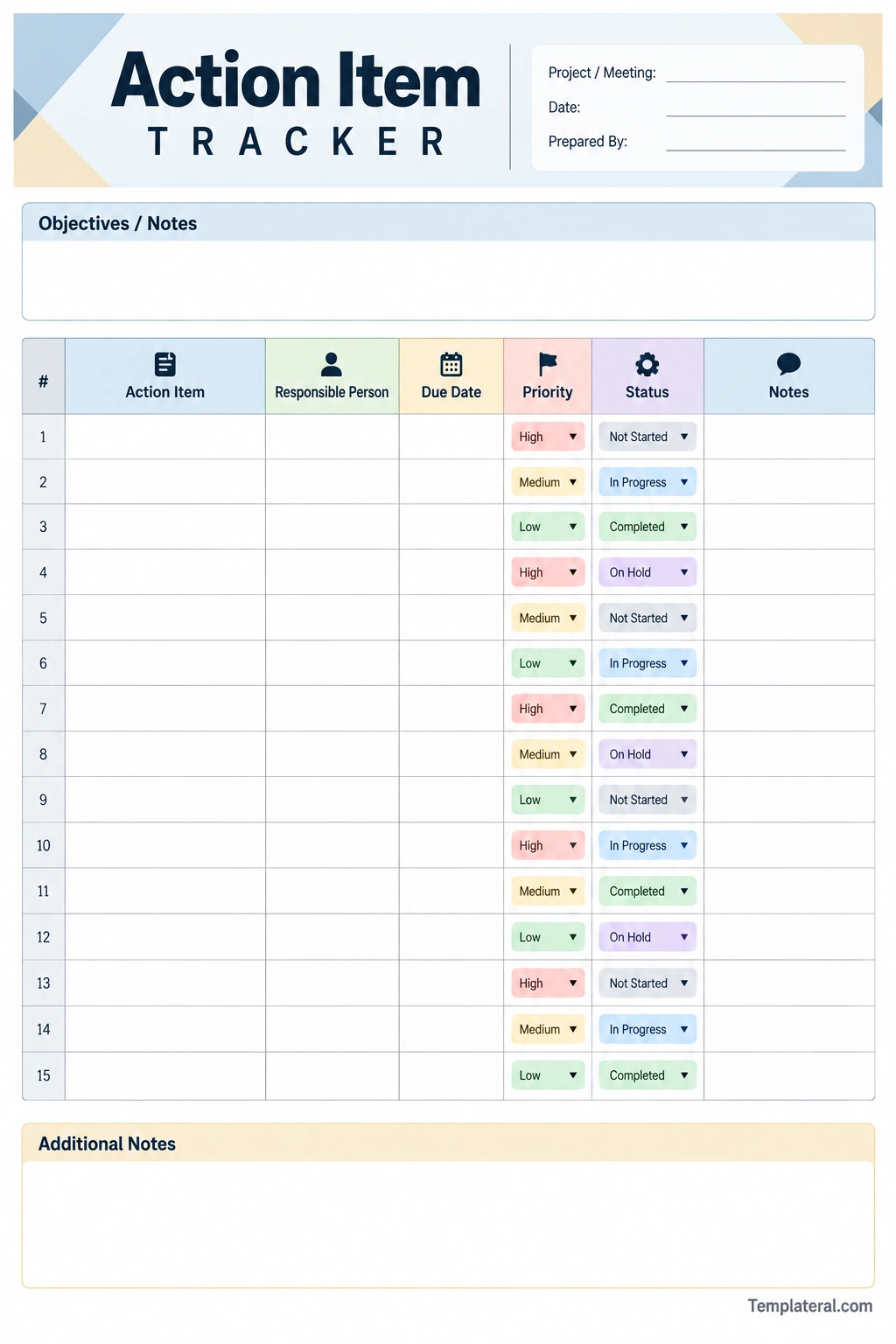
An action item tracker is a document, spreadsheet, worksheet, or project management tool used to record and monitor follow-up tasks.
A basic tracker allows a team to see what needs to be done, who is responsible, when it is due, and whether the task has been completed.
Common columns in an action item tracker include:
- Action Item: The task that needs to be completed.
- Responsible Person: The person assigned to the task.
- Due Date: The target completion date.
- Priority: The relative importance of the task.
- Status: The current stage of the task.
- Notes: Additional information or updates.
Keeping these details together creates a simple action register that can be reviewed throughout the project or meeting cycle.
What Should an Action Item Include?
A strong action item should contain enough information to eliminate uncertainty. The exact format can vary, but several elements are particularly useful.
Task Description
Describe exactly what needs to be done. Avoid vague phrases that could be interpreted in different ways.
For example, “Prepare the presentation slides” is more actionable than “Presentation.”
Responsible Person
Every important action item should have an owner. Assigning a specific person makes accountability clearer and reduces the possibility that everyone assumes someone else will complete the task.
Due Date
A deadline gives the task a clear target. When possible, use an exact date instead of vague terms such as “soon” or “later.”
Priority
Priority helps the team distinguish urgent or important tasks from activities that can be handled later. A simple system such as High, Medium, and Low is often sufficient.
Status
Status indicates where the task currently stands. Common statuses include Not Started, In Progress, Completed, and On Hold.
Notes
A notes field can be used for updates, dependencies, reminders, links, or other information related to the action item.
How to Create an Action Item List
Creating an action items list does not need to be complicated. The process can begin during the meeting and be finalized immediately afterward.
1. Identify Tasks During the Meeting
Listen for decisions, commitments, assignments, and follow-up requests. Whenever the discussion results in something that needs to be done, record it as a potential action item.
2. Write Each Task Clearly
Use a short but specific description. The person reading the task should understand what is expected without needing to reconstruct the entire meeting conversation.
3. Assign an Owner
Determine who is responsible for completing each task. If multiple people need to contribute, identify a primary owner and note other contributors when necessary.
4. Set a Deadline
Agree on a realistic due date. A deadline should reflect the urgency of the task as well as any dependencies that could affect completion.
5. Add Priority and Status
Assign a priority level and initial status. This makes it easier to sort or review the action item list later.
6. Review the List
Before ending the meeting, review the action items with the participants. Confirm that the tasks, owners, and deadlines are understood.
Action Item vs. Task
The terms action item and task are often used interchangeably, but they can have slightly different meanings depending on the context.
A task is generally any piece of work that needs to be completed. An action item is often a task that specifically results from a meeting, decision, discussion, or follow-up activity.
For example, “Update the project budget” can be a normal project task. If the team decides during a meeting that someone needs to update the budget before the next meeting, it becomes a clear meeting action item.
Action Item vs. Meeting Note
Meeting notes record information discussed during a meeting, while action items identify work that needs to happen afterward.
For example:
- Meeting note: The team discussed improving customer onboarding.
- Action item: Sarah will review the current onboarding process and present three improvement suggestions at the next meeting.
The meeting note documents what was discussed. The action item defines what happens next.
How to Prioritize Action Items
Not every action item has the same level of urgency. A simple priority system can help teams focus their attention on the work that matters most.
High Priority
High-priority action items usually have an urgent deadline, significant impact, or dependency on other work.
Medium Priority
Medium-priority tasks are important but may not require immediate attention. They should still have a defined deadline and owner.
Low Priority
Low-priority items can generally be completed after more urgent work has been addressed. They should still be tracked so they do not disappear from the team’s workload.
How to Track Action Items Effectively
Creating an action item list is only the first step. The tracker should also be reviewed regularly to make sure tasks are progressing.
Review Before the Next Meeting
Review open action items before the next meeting. This provides an opportunity to identify completed tasks, overdue items, and issues that require discussion.
Update Status Regularly
Do not leave the status unchanged for weeks. Updating tasks to reflect their current condition makes the tracker more useful to everyone involved.
Highlight Overdue Items
Pay attention to tasks that have passed their due date. Determine whether the deadline should be revised, additional resources are required, or another issue is preventing completion.
Close Completed Items
When a task has been completed, update its status rather than leaving it in the active task list. A completed history can still be useful for documenting what the team accomplished.
Common Action Item Statuses
A consistent status system makes an action item tracker easier to understand. You can use a simple set of statuses such as:
- Not Started: The task has been assigned but work has not begun.
- In Progress: Work is currently underway.
- Completed: The task has been finished.
- On Hold: Work has temporarily stopped because of a dependency or other issue.
- Cancelled: The task is no longer required.
Teams should use status labels consistently so everyone understands what each status means.
Action Item Examples
Here are several examples of clearly written action items:
- Marketing: Review the campaign performance report and prepare three recommendations by June 15.
- Project Management: Update the project timeline to reflect the revised development schedule.
- Finance: Verify the latest project expenses and provide an updated budget summary.
- Design: Revise the homepage mockup based on the feedback discussed during the meeting.
- Operations: Confirm the delivery schedule with the supplier before the next team meeting.
Each example identifies a specific activity rather than simply describing a general area of responsibility.
Benefits of Using an Action Item Template
An action item template provides a consistent structure for documenting follow-up work. Instead of creating a new format for every meeting, teams can use the same fields each time.
A template can help:
- Standardize meeting follow-up.
- Reduce forgotten tasks.
- Clarify ownership.
- Improve deadline tracking.
- Make priorities visible.
- Provide a central record of outstanding work.
- Make recurring meetings easier to manage.
A printable worksheet can be particularly useful for teams that prefer to record tasks during a face-to-face meeting before transferring them into a digital project management system.
Tips for Writing Better Action Items
Use an Action Verb
Start the task with a clear action verb such as Review, Prepare, Send, Confirm, Update, Contact, Create, Analyze, or Schedule.
Make the Outcome Clear
Describe what should exist or happen when the task is completed. This makes it easier to determine whether the action item has actually been finished.
Avoid Ambiguous Language
Words such as “handle,” “work on,” or “follow up” can be unclear without additional context. Replace them with a specific action and expected outcome.
Assign One Clear Owner
When responsibility is shared among several people, identify who owns the task. Other team members can be listed as contributors if necessary.
Set Realistic Deadlines
A deadline should be achievable. Unrealistic due dates can create unnecessary pressure and lead to repeated deadline changes.
Common Mistakes in Action Item Tracking
Even a simple tracker can become ineffective if it is not maintained properly. Avoid the following problems:
- Vague descriptions: Tasks should clearly explain what needs to happen.
- No assigned owner: Every important action should have a responsible person.
- Missing deadlines: Without a due date, priorities can become unclear.
- Too many active items: An overloaded tracker can make important work harder to identify.
- Outdated statuses: Update the tracker as work progresses.
- Ignoring overdue tasks: Discuss obstacles rather than allowing overdue items to remain unchanged.
- Failing to review the tracker: A tracker only provides value when the team actually uses it.
When Should You Use an Action Item Tracker?
An action item tracker can be useful whenever a meeting or discussion produces follow-up work. It is particularly valuable for recurring meetings, project teams, management reviews, planning sessions, and cross-functional initiatives.
Common uses include:
- Weekly team meetings
- Project status meetings
- Client meetings
- Management reviews
- Planning sessions
- Product development meetings
- Quality improvement meetings
- Project kickoff meetings
- Retrospectives
- Operational reviews
Final Thoughts on Action Items
An action item turns a meeting decision or discussion into a clearly defined piece of work. By identifying the task, assigning an owner, setting a deadline, and tracking its status, teams can make meeting outcomes more actionable and easier to manage.
An action item tracker provides a simple structure for keeping these responsibilities visible. Whether you use a printable worksheet, spreadsheet, or project management system, the most important principle is consistency.
A well-maintained action items list helps teams understand what needs to happen next, who is responsible, and whether the work is progressing as expected. With clear action items and regular follow-up, meetings can produce measurable results instead of becoming isolated conversations.
Download: Action Item Template
