Cornell note taking is a structured method for recording, organizing, reviewing, and summarizing information. Instead of filling an entire page with notes, the Cornell method divides the page into specific sections for detailed notes, key questions or cues, and a summary.
This approach can be useful for students, teachers, professionals, and anyone who needs to remember information from lectures, textbooks, meetings, presentations, or study sessions. Its simple layout encourages you to do more than just record information because it also creates space for reviewing and processing what you have learned.
A Cornell notes template makes the process even easier by providing a ready-made structure. Once you understand what belongs in each section, you can use the same format for different subjects and types of information.
What Is Cornell Note Taking?
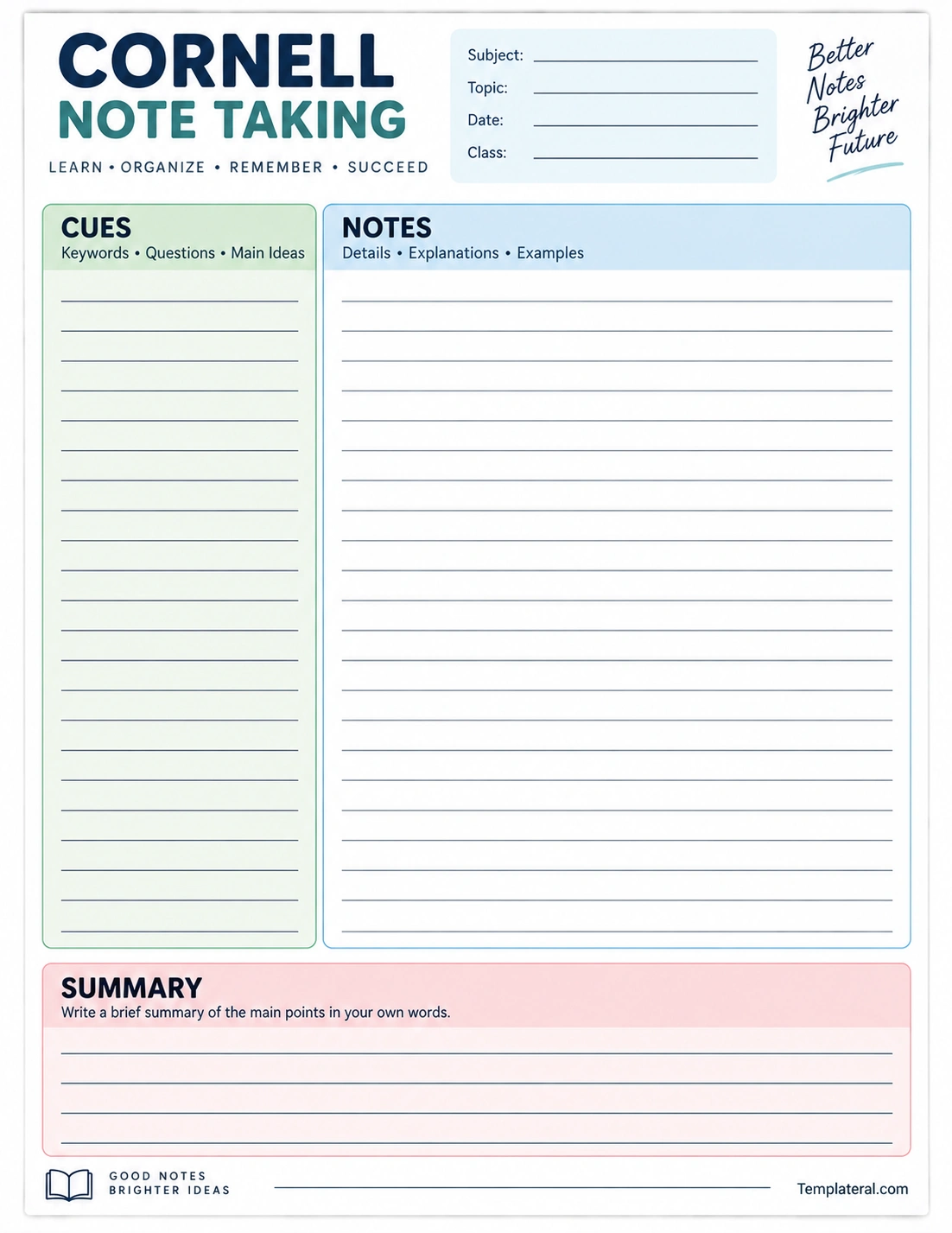
Cornell note taking is a note-taking system designed to organize information into separate areas of a page. The traditional Cornell format includes a large notes section, a narrower cue column, and a summary section at the bottom.
The notes section is used during a lecture, reading, or study session. The cue section can be completed afterward with keywords, questions, concepts, or prompts. The summary section provides space to explain the main ideas in your own words.
This structure creates a natural review process. Instead of simply rereading a page of notes, you can cover the notes and use the cues to test your memory.
What Are the Three Parts of Cornell Notes?
A standard Cornell notes page is divided into three primary areas. Each area has a specific purpose.
1. Notes Section
The large right-hand section is where you record information during a lecture, reading, presentation, or study session. Important facts, explanations, examples, definitions, and supporting details can be written here.
Try to record the most important information rather than attempting to write down every word you hear or read.
2. Cue or Questions Section
The narrower left-hand column is used for keywords, questions, headings, and prompts. These cues can help you identify the main concepts and later test yourself on the material.
For example, if your notes explain photosynthesis, the cue column might contain questions such as “What is photosynthesis?” or “What are the main stages?”
3. Summary Section
The bottom portion of the page is reserved for a short summary. After completing your notes, explain the main ideas in your own words.
Writing a summary encourages you to identify what matters most instead of simply copying information from your notes.
How Does the Cornell Note Taking Method Work?
The Cornell method generally works through several stages. The first stage focuses on recording information, while later stages focus on organization, review, and recall.
Record
During a lecture or reading session, use the notes section to record important information. Use short phrases, abbreviations, keywords, and concise explanations when appropriate.
Question
After the lesson or study session, review your notes and create questions or keywords in the cue column. These prompts should help you identify and recall the information in the notes section.
Recite
Cover the main notes and try to answer the questions in the cue column from memory. Explain the concepts aloud or mentally without looking at the answers.
Reflect
Think about how the information connects to what you already know. Consider the most important ideas, relationships, examples, or conclusions.
Review
Regularly revisit your Cornell notes rather than waiting until the night before an exam. Short review sessions can make it easier to remember important concepts.
Benefits of Cornell Note Taking
The Cornell method provides a structured approach to note taking that can be useful when studying large amounts of information.
- Organizes information: Notes are separated into clearly defined sections.
- Encourages active learning: Questions and summaries require you to process information.
- Supports review: The cue column provides built-in study questions.
- Improves recall: Trying to remember information without looking at the notes encourages active retrieval.
- Reduces clutter: The structured layout can make lengthy notes easier to navigate.
- Encourages summarization: The bottom section requires you to identify the main ideas.
- Creates reusable study material: Completed pages can become review sheets for future tests.
How to Take Cornell Notes Step by Step
Step 1: Prepare Your Page
Start with a Cornell notes template or create three sections on a blank page. Label the main notes area, cue column, and summary section.
Step 2: Add Basic Information
Write the subject, topic, date, and class or lesson information at the top of the page. This makes your notes easier to identify later.
Step 3: Record Important Information
During the lesson, focus on major ideas, definitions, examples, formulas, explanations, and important supporting details. Use concise language rather than attempting to transcribe everything.
Step 4: Add Cues
After the lesson, review the notes and identify the concepts that deserve attention. Turn those concepts into questions, keywords, or short prompts in the cue column.
Step 5: Write a Summary
Write a brief summary at the bottom of the page. Try to explain the main lesson in your own words rather than copying sentences directly from the notes.
Step 6: Review Regularly
Use the cue column to quiz yourself. Cover the notes and try to answer each question. Then check your answer against the original notes.
Cornell Note Taking for Students
Cornell note taking can be adapted to many school subjects. Students can use the method for lectures, textbook chapters, research, classroom discussions, and exam preparation.
For subjects involving facts and definitions, the cue column can contain vocabulary and questions. For subjects involving complex ideas, it can contain concepts that require explanation.
For example, a history student might use the cue column for dates and historical events, while the notes section contains causes, important figures, consequences, and supporting details.
Cornell Notes for Different Subjects
Science
Use the notes section for concepts, processes, definitions, diagrams, and examples. The cue column can contain questions about how or why a process works.
History
Record important dates, events, people, causes, consequences, and historical context. Questions in the cue column can help connect events and explain their significance.
Mathematics
Use the notes section for formulas, examples, procedures, and problem-solving steps. The cue column can contain formulas, concepts, or questions about when a particular method should be used.
Literature
Record themes, characters, important passages, literary devices, and interpretations. Cue questions can help you prepare for essay questions or class discussions.
Business and Professional Learning
The Cornell method can also be used for meetings, workshops, training sessions, conferences, and professional development. Use the cue column for key questions, decisions, or action points.
Cornell Note Taking Tips
A structured template is helpful, but the quality of the notes still depends on how you use it. A few simple habits can make the method more effective.
- Focus on key ideas: Do not try to record every sentence.
- Use your own words: Paraphrasing can improve understanding.
- Highlight important information: Mark definitions, formulas, dates, and major concepts when useful.
- Write questions: Turn important concepts into questions that can be used for self-testing.
- Summarize quickly: Complete the summary while the material is still fresh.
- Review consistently: Use short, repeated review sessions rather than relying on one long study session.
- Keep pages organized: Add dates and topics so you can find specific notes later.
Common Cornell Note Taking Mistakes
Even a good note-taking system can become less effective if the sections are not used properly.
- Writing everything word for word.
- Leaving the cue column blank.
- Skipping the summary section.
- Using overly long sentences instead of concise notes.
- Failing to review the notes after class.
- Creating questions that are too vague.
- Focusing on formatting instead of understanding the information.
The purpose of Cornell notes is not to create a perfect-looking page. The goal is to create useful notes that help you understand and remember information.
How to Use a Cornell Notes Template
A Cornell notes template provides the basic page structure so you can focus on the information rather than drawing columns and sections yourself. A printable template can be particularly useful for students who prefer handwriting their notes.
Start by entering the subject, topic, and date. During the lesson, use the large notes section. Afterward, add questions or keywords to the cue column and finish by writing a short summary.
Completed templates can then be stored in a binder, folder, or notebook for future review.
Cornell Note Taking Checklist
Use this checklist after completing a page of Cornell notes:
- Did I record the subject and date?
- Did I focus on the most important information?
- Did I use concise notes?
- Did I identify important keywords?
- Did I add useful questions to the cue column?
- Did I explain important concepts in my own words?
- Did I write a summary?
- Can I answer the cue questions without looking at my notes?
- Have I reviewed the page since creating it?
Final Thoughts
Cornell note taking provides a simple structure for recording information while also encouraging active review and recall. By separating detailed notes, cues, and summaries, the method turns an ordinary page of notes into a practical study resource.
The key is to use all three sections consistently. Record important information, create meaningful questions or keywords, and summarize the lesson in your own words. With regular review, a printable Cornell notes template can become a useful tool for studying, learning, and organizing information across many subjects.
Download: Cornell Note Taking Template
