A minutes of meeting form provides a structured way to record what happens during a meeting. Instead of relying on scattered notes, a well-organized form helps capture important information such as meeting details, attendees, agenda items, discussions, decisions, action items, and follow-up dates.
Meeting minutes can be useful for businesses, schools, nonprofit organizations, project teams, committees, and community groups. A consistent format makes it easier to review what was discussed and understand what needs to happen after the meeting.
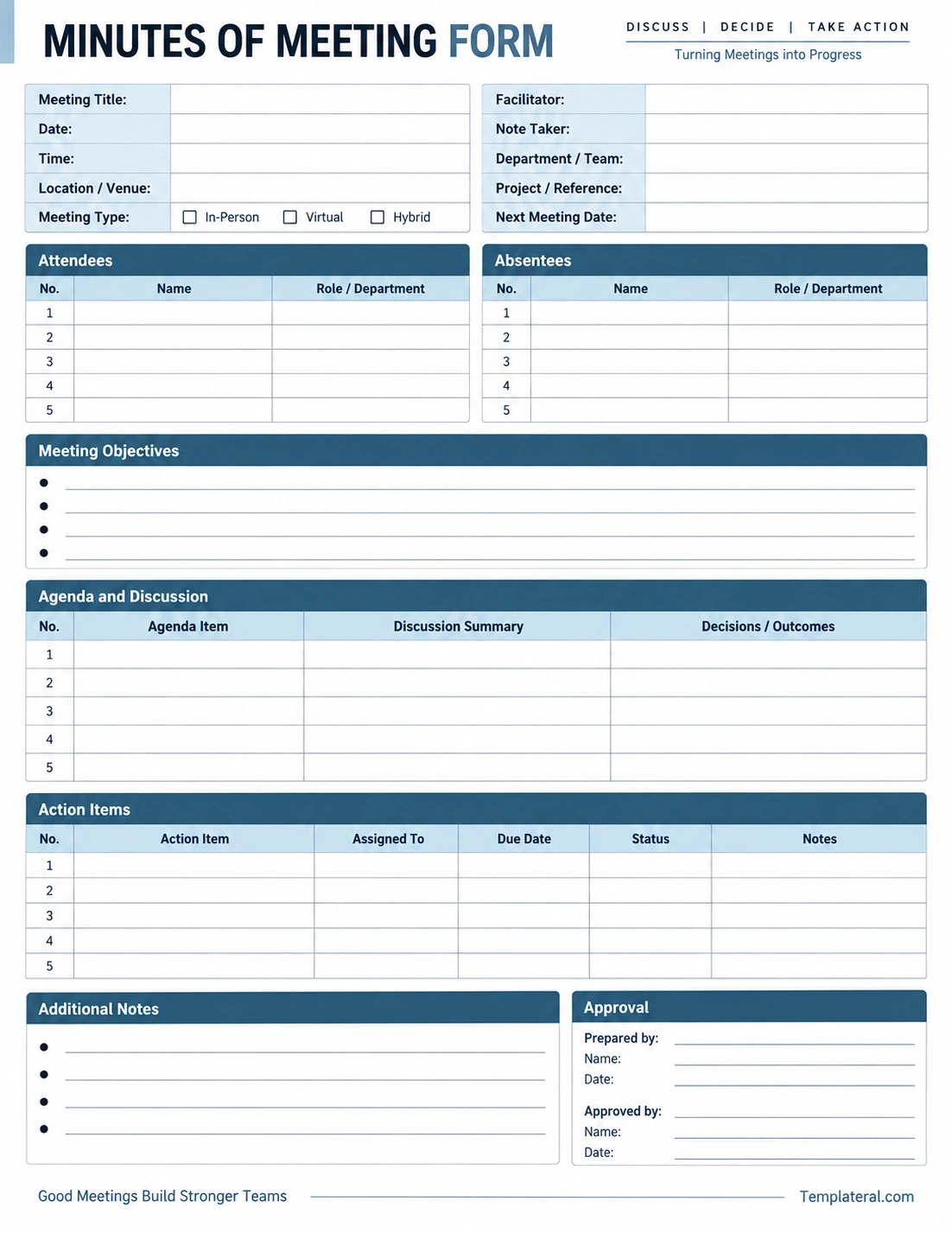
The printable template below provides a clean structure for recording essential meeting information from the beginning of the meeting through follow-up and approval.
What Is a Minutes of Meeting Form?
A minutes of meeting form is a structured document used to record the key information and outcomes of a meeting. It is sometimes referred to as a meeting minutes template, meeting notes form, or meeting minutes worksheet.
The form typically provides designated sections for the meeting title, date, time, location, participants, agenda items, discussion summaries, decisions, assigned tasks, deadlines, and additional notes.
The purpose is not to record every word spoken during a meeting. Instead, effective meeting minutes focus on information that is useful for understanding the meeting and completing the work that follows.
Why Are Meeting Minutes Important?
Good meeting minutes create a written record that participants can refer to after the meeting. They can help reduce misunderstandings and make responsibilities clearer.
A consistent meeting minutes format can also make recurring meetings easier to manage because information is recorded in a predictable structure.
- Records important decisions and outcomes.
- Documents who attended the meeting.
- Provides a record of assigned tasks.
- Identifies deadlines and follow-up dates.
- Helps absent participants understand what was discussed.
- Creates a reference for future meetings.
- Improves accountability for action items.
What Should Be Included in a Minutes of Meeting Form?
The exact structure can vary depending on the organization and type of meeting. However, a useful meeting minutes form usually includes several core sections.
Meeting Information
Start by recording basic details such as the meeting title, date, time, location, meeting type, department, project, facilitator, and note taker.
For virtual or hybrid meetings, you may also include the meeting platform or connection information when useful.
Attendees
Record the names of people who participated in the meeting. Depending on the purpose of the meeting, you may also record their roles, departments, or organizations.
Absentees
A separate absentee section can identify people who were expected to participate but were not present. This can be particularly useful for recurring team meetings and formal committee meetings.
Meeting Objectives
List the main objectives or goals of the meeting. This section helps connect the meeting agenda with its intended outcomes.
Agenda and Discussion
Record the topics discussed during the meeting and summarize the important points. Avoid trying to capture every conversation word for word.
Decisions and Outcomes
Clearly document decisions that were made during the meeting. Separating decisions from general discussion makes the final minutes easier to review.
Action Items
Action items identify tasks that need to be completed after the meeting. A useful action item table includes the task, assigned person, due date, status, and relevant notes.
Additional Notes
Use the notes section for important information that does not fit neatly into the agenda or action-item sections.
Approval
For meetings that require formal review, an approval section can identify who prepared and approved the minutes, along with the relevant dates.
How to Take Effective Meeting Minutes
Taking meeting minutes becomes easier when you prepare before the meeting begins. A structured form can help you focus on the information that matters most.
Prepare the Form in Advance
Enter known information before the meeting starts. Add the meeting title, date, agenda, facilitator, and other details that are already available.
Focus on Important Information
Listen for decisions, assignments, deadlines, questions that require follow-up, and changes to existing plans. These details are generally more useful than recording every statement.
Use Short Notes
During the meeting, use concise phrases rather than trying to write complete paragraphs. You can organize and clarify the notes after the discussion has ended.
Record Decisions Clearly
When a decision is made, make it easy to identify in your notes. A clear record should indicate what was decided and, when relevant, who is responsible for implementing it.
Confirm Action Items
Before the meeting ends, review important assignments and deadlines. This gives participants an opportunity to correct misunderstandings while everyone is still present.
Meeting Minutes vs. Meeting Notes
Meeting minutes and meeting notes are related, but they do not always serve the same purpose.
Meeting notes may be informal and can include personal reminders, observations, ideas, or detailed working notes. They are often created for the note taker’s own use.
Meeting minutes are generally more structured and are intended to provide a useful record of the meeting. They typically focus on participants, topics, decisions, action items, and other significant outcomes.
The appropriate level of detail depends on the type and purpose of the meeting.
How to Structure a Meeting Minutes Form
A practical form should follow the natural flow of a meeting. Organizing the sections in the correct order makes the document easier to complete.
Beginning of the Meeting
Start with meeting identification information, including the title, date, time, location, facilitator, and participants.
During the Discussion
Use the agenda and discussion section to record the main topics and relevant discussion summaries. When a decision is made, record the outcome clearly.
End of the Meeting
Review action items, assigned responsibilities, deadlines, and the date of the next meeting if one has been scheduled.
After the Meeting
Review the minutes for accuracy, correct unclear wording, and distribute or archive the final document according to your organization’s process.
Action Items in Meeting Minutes
One of the most useful sections of a meeting minutes form is the action-item table. It converts discussion into specific follow-up tasks.
A strong action item should identify what needs to be done, who is responsible, and when the task should be completed.
- Action item: Describe the required task clearly.
- Assigned to: Identify the responsible person or team.
- Due date: Record the agreed deadline.
- Status: Track whether the task is pending, in progress, or completed.
- Notes: Add relevant context or follow-up information.
For recurring meetings, reviewing previous action items at the beginning of the next meeting can help the team track progress.
Tips for Writing Better Meeting Minutes
Effective meeting minutes should be clear, objective, and easy to scan. The following practices can improve the quality of your records.
- Use a consistent meeting minutes template.
- Write objectively rather than adding personal opinions.
- Focus on decisions and meaningful outcomes.
- Use names when assigning responsibilities.
- Record deadlines whenever they are established.
- Separate discussion summaries from final decisions.
- Use short paragraphs or table entries.
- Review the document soon after the meeting.
- Correct obvious errors before distributing the minutes.
- Store completed minutes where authorized participants can access them.
Common Mistakes When Taking Meeting Minutes
Even a structured meeting minutes form can be ineffective if important information is missing or unclear.
Recording Too Much Detail
Trying to capture every sentence can make the minutes difficult to review. Focus on significant discussion points, decisions, assignments, and outcomes.
Leaving Action Items Unclear
An action item without an owner or deadline may be difficult to follow up on. Whenever possible, record both the responsible person and expected completion date.
Mixing Opinions With Decisions
Meeting minutes should distinguish between ideas discussed and decisions that were actually made. This prevents suggestions from being mistaken for approved actions.
Waiting Too Long to Finalize the Minutes
Finishing the minutes while the discussion is still fresh can make it easier to clarify incomplete notes and identify missing information.
Forgetting the Next Meeting
If a follow-up meeting has been scheduled, record its date and relevant details. This creates a useful reference for future planning.
Minutes of Meeting Form for Different Types of Meetings
A meeting minutes form can be adapted to different environments and purposes.
Business Team Meetings
Business teams can use meeting minutes to record project updates, decisions, responsibilities, deadlines, and operational issues.
Project Meetings
Project teams can emphasize milestones, risks, open issues, task ownership, and next steps.
Committee Meetings
Committees may need more formal records of attendees, agenda items, motions, decisions, and approvals depending on their procedures.
School Meetings
Teachers, administrators, student organizations, and school committees can use meeting forms to organize discussions, responsibilities, and follow-up activities.
Nonprofit and Community Meetings
Community groups and nonprofit organizations can use meeting minutes to maintain a consistent record of discussions, decisions, projects, and volunteer responsibilities.
Using a Printable Minutes of Meeting Form
A printable minutes of meeting form can be useful when participants prefer handwritten notes or when a meeting takes place in an environment where a printed worksheet is convenient.
A blank meeting minutes form can also be used as a planning document before the meeting. Known information can be entered in advance, leaving the discussion, decision, and action-item sections available for notes during the meeting.
Afterward, the completed form can be reviewed and converted into a final digital record when necessary.
Digital vs. Printable Meeting Minutes Forms
Digital and printable forms each have practical uses. A digital meeting minutes template is convenient for remote meetings, collaborative editing, searching, and electronic storage.
A printable form can be useful for in-person meetings, handwritten notes, quick planning, or situations where participants prefer working with paper.
The best format depends on the meeting environment, organizational workflow, and record-keeping requirements.
Minutes of Meeting Form Checklist
Before finalizing your meeting minutes, check that the document contains the important information.
- Meeting details: Title, date, time, location, and meeting type.
- Participants: Attendees and absentees when relevant.
- Objectives: Main goals of the meeting.
- Agenda: Topics discussed.
- Discussion: Important points and relevant context.
- Decisions: Clearly identified outcomes.
- Action items: Tasks, owners, and deadlines.
- Next meeting: Follow-up date when applicable.
- Approval: Review and approval information when required.
Conclusion
A minutes of meeting form provides a simple and organized way to document important meeting information. By separating meeting details, participants, agenda topics, discussions, decisions, and action items, the form makes the final record easier to understand and use.
The most effective meeting minutes focus on meaningful information rather than attempting to record every word spoken. Clear decisions, assigned responsibilities, deadlines, and follow-up items should receive particular attention.
Whether you use a printable meeting minutes form, digital template, or customized document, maintaining a consistent structure can make meetings easier to document and follow up on. A well-designed template provides a practical starting point for creating clear and useful meeting records.
Download: Minutes of Meeting Form Template
