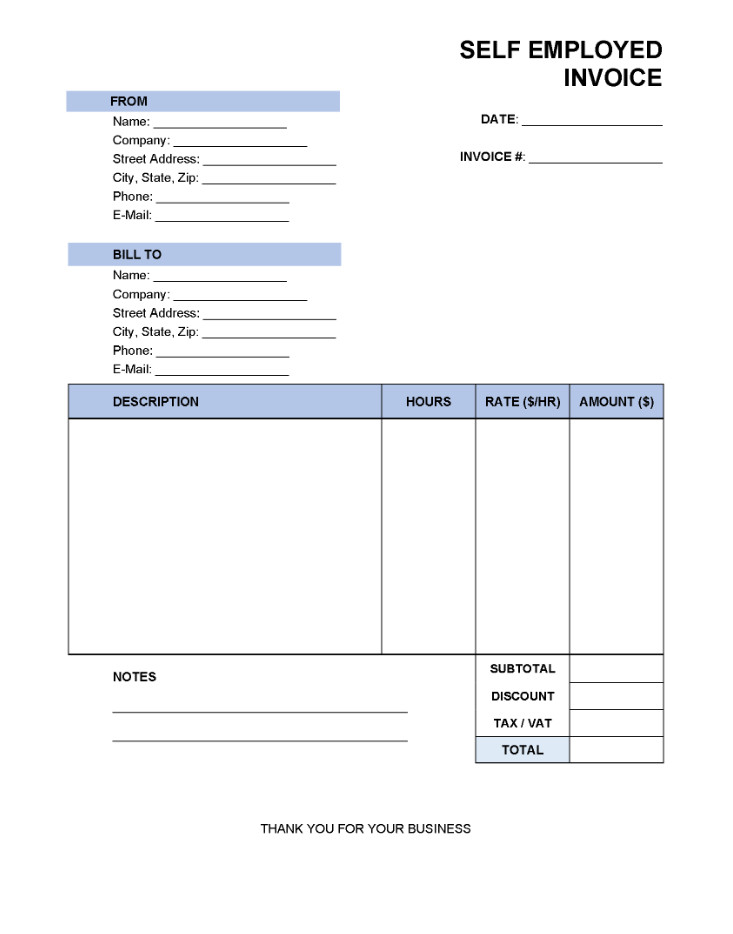
As a self-employed individual, managing your finances is crucial for the success of your business. One essential aspect of financial management is creating and sending invoices for the goods or services you provide. An invoice serves as a formal request for payment, a legal record of the transaction, and a crucial document for accounting and tax purposes. It provides clients with the necessary details to pay for goods or services rendered, while also creating a professional record of income and a legal basis for the payment obligation.
What is a Self-Employed Invoice?
A self-employed invoice is a document that freelancers and independent contractors use to bill their clients for the work they have completed. It typically includes details such as the freelancer’s contact information, the client’s contact information, a description of the services provided, the cost of the services, and the payment terms. Invoices are used to keep track of income, provide evidence of transactions, and facilitate the payment process.
Why are Self-Employed Invoices Important?
Self-employed invoices are important for several reasons:
- Legal Record: An invoice serves as a legal record of the transaction between the freelancer and the client. It outlines the services provided, the cost of those services, and the payment terms, which can help resolve disputes in case of a disagreement.
- Payment Request: An invoice is a formal request for payment from the client. It provides the client with the necessary details to make the payment, including the amount due, the due date, and the payment methods accepted.
- Accounting Purposes: Invoices are essential for accounting purposes. They help freelancers keep track of their income, expenses, and outstanding payments, making it easier to prepare financial statements and file taxes.
- Professionalism: Sending invoices to clients creates a professional image for the freelancer. It demonstrates that they are running a legitimate business and have a structured process for billing and collecting payment.
What to Include in a Self-Employed Invoice
When creating a self-employed invoice, there are several key elements that should be included:
- Contact Information: Include your name, business name (if applicable), address, phone number, and email address.
- Client Information: Include the client’s name, business name (if applicable), address, phone number, and email address.
- Invoice Number: Assign a unique invoice number to each invoice for easy reference and tracking.
- Description of Services: Provide a detailed description of the services provided, including the date of service, the quantity, and the rate.
- Cost of Services: Clearly state the cost of each service, calculate the total amount due, and specify any taxes or discounts.
- Payment Terms: Outline the payment terms, including the due date, accepted payment methods, and any late fees or penalties.
How to Create and Send Self-Employed Invoices
Creating and sending self-employed invoices is a straightforward process that can be done manually or using online invoicing tools. Here are the steps to follow:
1. Choose an Invoicing Method:
Decide whether you want to create invoices manually using software like Microsoft Word or Excel, or use online invoicing tools like QuickBooks, FreshBooks, or Wave.
2. Include Key Information:
Make sure to include all the necessary information in your invoice, such as your contact information, client information, invoice number, description of services, cost of services, and payment terms.
3. Customize the Invoice:
Add your logo, brand colors, and any other customizations to make your invoice reflect your brand and professional image.
4. Send the Invoice:
Send the invoice to your client via email or mail. Follow up with the client to ensure they received the invoice and are aware of the payment due date.
5. Track Payments:
Keep track of payments received and outstanding invoices. Follow up with clients on overdue payments and send reminders if necessary.
6. Store Invoices Securely:
Keep copies of all invoices for your records and for tax purposes. Store them in a secure location either electronically or in hard copy.
7. Review and Improve:
Regularly review your invoicing process and make improvements as needed. Consider using invoicing software to streamline the process and save time.
Tips for Effective Invoicing
Here are some tips to help freelancers create and send effective invoices:
- Be Clear and Concise: Make sure your invoice is easy to understand and includes all the necessary information for the client to process payment.
- Set Clear Payment Terms: Clearly outline the payment terms, including the due date, accepted payment methods, and any late fees.
- Follow Up Promptly: Follow up with clients on overdue payments and send reminders to ensure timely payment.
- Keep Detailed Records: Keep copies of all invoices and payment receipts for your records and for tax purposes.
- Consider Using Invoicing Software: Invest in online invoicing tools to streamline the invoicing process and save time.
- Stay Organized: Keep track of all invoices, payments, and expenses to maintain financial organization and efficiency.
- Seek Professional Advice: Consult with a tax professional or accountant to ensure you are compliant with tax laws and regulations.
Self-employed Invoice Template
